首页演练场案例展示应用文档博客
    • English英语
      EN
    • русский俄语
      RU
    • 日本語日语
      JA
    • français法语
      FR
    • 한국어韩语
      KO
    • 中文中文
      ZH
    • español西班牙语
      ES
    • Deutsch德语
      DE
    • العربية阿拉伯语
      AR
    • italiano意大利语
      IT
    • British English英国英语
      EN-GB
    • português葡萄牙语
      PT
    • हिन्दी印地语
      HI
    • Türkçe土耳其语
      TR
    • polski波兰语
      PL
    • Indonesia印度尼西亚语
      ID
    • Tiếng Việt越南语
      VI
    • українська乌克兰语
      UK
    /
    按框架筛选文档
    Alt+←
    为什么Intlayer?
    开始
    概念
    • Intlayer如何工作
    • 配置
    • TestFillBuildWatchExtractLoginPushPullConfigurationListVersionEditorLiveDebugDoc ReviewDoc TranslateSDK
    • 可视化编辑器
    • CMS
    • CI/CD集成
    • 翻译复数枚举条件性别插入文件嵌套MarkdownHTML函数获取
    • 每个语言环境的文件
    • 编译器
    • 自动填充
    • 测试
    • 打包优化
    环境
    • Next.js 14和应用路由器
      Next.js 15
      Next.js 无 locale URL
      Next.js和页面路由器
      编译器
    • Tanstack Start Solid
    • Astro和React
      Astro和Svelte
      Astro和Vue
      Astro和Solid
      Astro和Preact
      Astro和Lit
      Astro和Vanilla JS
    • React Router v7
      React Router v7 (fs-routes)
      Compiler
    • Nuxt和Vue
    • Vite和Solid
    • SvelteKit
    • Vite和Preact
    • Vite和Vanilla JS
    • Vite和Lit
    • Angular 19 (Webpack)
      Analog
    • React CRA
    • React Native和Expo
    • Express.js
      NestJS
      Fastify
      Hono
      Adonis
    • Lynx和React
    Plugins
    • JSON
    • gettext (.po)
    VS Code扩展
    代理
    • MCP服务器
    • 代理技能
    发布
    • v8
    • v7
    • v6
    基准测试
    • Next.js
    • TanStack
    • Vue
    • Solid
    • Svelte
    博客
    问问题
    1. Documentation
    2. 环境
    3. Astro
    Creation:2024-03-07Last update:2026-05-06
    在 GitHub 上查看应用程序模板

    此页面有可用的应用程序模板。

    查看展示应用

    此页面链接到模板的在线演示。

    将此文档参考到您的 AI 助手
    ChatGPT
    Claude
    DeepSeek
    Google AI mode
    Gemini
    Perplexity
    Mistral
    Grok

    使用您最喜欢的AI助手总结文档,并引用此页面和AI提供商

    版本历史

    1. "更新 Solid useIntlayer API 用法以直接访问属性"
      v8.9.02026/5/4
    2. "添加 init 命令"
      v7.5.92025/12/30
    3. "更新 Astro 注入、配置和用法"
      v6.2.02025/10/3

    此页面的内容已使用 AI 翻译。

    查看英文原文的最新版本
    编辑此文档

    如果您有改善此文档的想法,请随时通过在GitHub上提交拉取请求来贡献。

    文档的 GitHub 链接
    Copy

    复制文档 Markdown 到剪贴板

    使用 Intlayer 翻译您的 Astro 网站 | 国际化 (i18n)

    ide.intlayer.org
    intlayer-astro-template.vercel.app

    目录

    什么是 Intlayer?

    Intlayer 是一个创新且开源的国际化 (i18n) 库,旨在简化现代 Web 应用程序的多语言支持。

    使用 Intlayer,您可以:

    • 轻松管理翻译:使用组件级的声明式词典。
    • 动态本地化元数据、路由和内容。
    • 确保 TypeScript 支持:通过自动生成的类型增强自动补全和错误检测。
    • 受益于高级功能:如动态语言检测和语言切换。

    在 Astro 中配置 Intlayer 的分步指南

    在 GitHub 上查看应用程序模板。

    第一步:安装依赖

    使用您喜欢的包管理器安装所需的软件包:

    bash
    复制代码

    复制代码到剪贴板

    npm install intlayer astro-intlayer# 可选:如果添加 React 岛支持npm install react react-dom react-intlayer @astrojs/react
    • intlayer 核心软件包,提供用于配置管理、翻译、内容声明、编译和 CLI 命令的国际化工具。

    • astro-intlayer 包含将 Intlayer 与 Vite 构建器集成的 Astro 集成插件,以及用于检测用户首选语言、管理 Cookie 和处理 URL 重定向的中间件。

    第二步:配置您的项目

    创建一个配置文件来定义您的应用程序语言:

    intlayer.config.ts
    复制代码

    复制代码到剪贴板

    import { Locales, type IntlayerConfig } from "intlayer";const config: IntlayerConfig = {  internationalization: {    locales: [      Locales.ENGLISH,      Locales.FRENCH,      Locales.SPANISH,      // 您的其他语言    ],    defaultLocale: Locales.ENGLISH,  },};export default config;
    通过此配置文件,您可以配置本地化 URL、中间件重定向、Cookie 名称、内容声明的位置和扩展名、在控制台中禁用 Intlayer 日志等。有关可用参数的完整列表,请参阅配置文档。

    第三步:在 Astro 配置中集成 Intlayer

    将 intlayer 插件添加到您的 Astro 配置中。

    astro.config.ts
    复制代码

    复制代码到剪贴板

    // @ts-checkimport { intlayer } from "astro-intlayer";import { defineConfig } from "astro/config";// https://astro.build/configexport default defineConfig({  integrations: [intlayer()],});
    intlayer() 集成插件用于将 Intlayer 与 Astro 集成。它确保内容声明文件的构建并在开发模式下进行监视。它在 Astro 应用程序中定义 Intlayer 环境变量,并提供别名以优化性能。

    第四步:声明您的内容

    创建并管理您的内容声明以存储翻译:

    src/app.content.tsx
    复制代码

    复制代码到剪贴板

    import { t, type Dictionary } from "intlayer";import type { ReactNode } from "react";const appContent = {  key: "app",  content: {    title: t({      en: "Hello World",      fr: "Bonjour le monde",      es: "Hola mundo",      zh: "你好,世界",    }),  },} satisfies Dictionary;export default appContent;
    只要您的内容声明包含在 contentDir(默认为 ./src)中,且匹配内容声明文件扩展名(默认为 .content.{json,ts,tsx,js,jsx,mjs,cjs}),就可以在应用程序的任何位置定义。
    有关更多信息,请参阅内容声明文档。

    第五步:在 Astro 中使用内容

    您可以使用 intlayer 导出的核心辅助函数直接在 .astro 文件中消费词典。

    src/pages/index.astro
    复制代码

    复制代码到剪贴板

    ---import {  getIntlayer,  getLocaleFromPath,  getLocalizedUrl,  defaultLocale,  localeMap,  getHTMLTextDir,  type LocalesValues,} from "intlayer";import LocaleSwitcher from "../components/LocaleSwitcher.astro";// Get the current locale from the URL (e.g. /es/about -> 'es')const locale = getLocaleFromPath(Astro.url.pathname) as LocalesValues;// Get the content for the 'app' dictionaryconst { title } = getIntlayer("app", locale);---<!doctype html><html lang={locale} dir={getHTMLTextDir(locale)}>  <head>    <meta charset="utf-8" />    <meta name="viewport" content="width=device-width" />    <link rel="icon" type="image/svg+xml" href="/favicon.svg" />    <title>{title}</title>    <!-- Canonical link: Tells search engines which is the primary version of this page -->    <link      rel="canonical"      href={new URL(getLocalizedUrl(Astro.url.pathname, locale), Astro.site)}    />    <!-- Hreflang: Tell Google about all localized versions -->    {      localeMap(({ locale: mapLocale }) => (        <link          rel="alternate"          hreflang={mapLocale}          href={new URL(            getLocalizedUrl(Astro.url.pathname, mapLocale),            Astro.site          )}        />      ))    }    <!-- x-default: Fallback for users in unmatched languages -->    <link      rel="alternate"      hreflang="x-default"      href={new URL(        getLocalizedUrl(Astro.url.pathname, defaultLocale),        Astro.site      )}    />  </head>  <body>    <header>      <LocaleSwitcher />    </header>    <main>      <h1>{title}</h1>    </main>  </body></html>

    第六步:本地化路由

    创建动态路由段以提供本地化页面(例如 src/pages/[locale]/index.astro):

    src/pages/[locale]/index.astro
    复制代码

    复制代码到剪贴板

    <!-- astro -->---import { getIntlayer } from "intlayer";const { title } = getIntlayer('app');---<h1>{title}</h1>

    Astro 集成添加了一个 Vite 中间件,有助于在开发期间进行语言感知路由和环境定义。您还可以使用自己的逻辑或 intlayer 的 getLocalizedUrl 等工具创建语言之间的链接。

    第七步:继续使用您喜欢的框架

    继续使用您喜欢的框架构建您的应用程序。

    • Intlayer + React: Intlayer with React
    • Intlayer + Vue: Intlayer with Vue
    • Intlayer + Svelte: Intlayer with Svelte
    • Intlayer + Solid: Intlayer with Solid
    • Intlayer + Preact: Intlayer with Preact

    TypeScript 配置

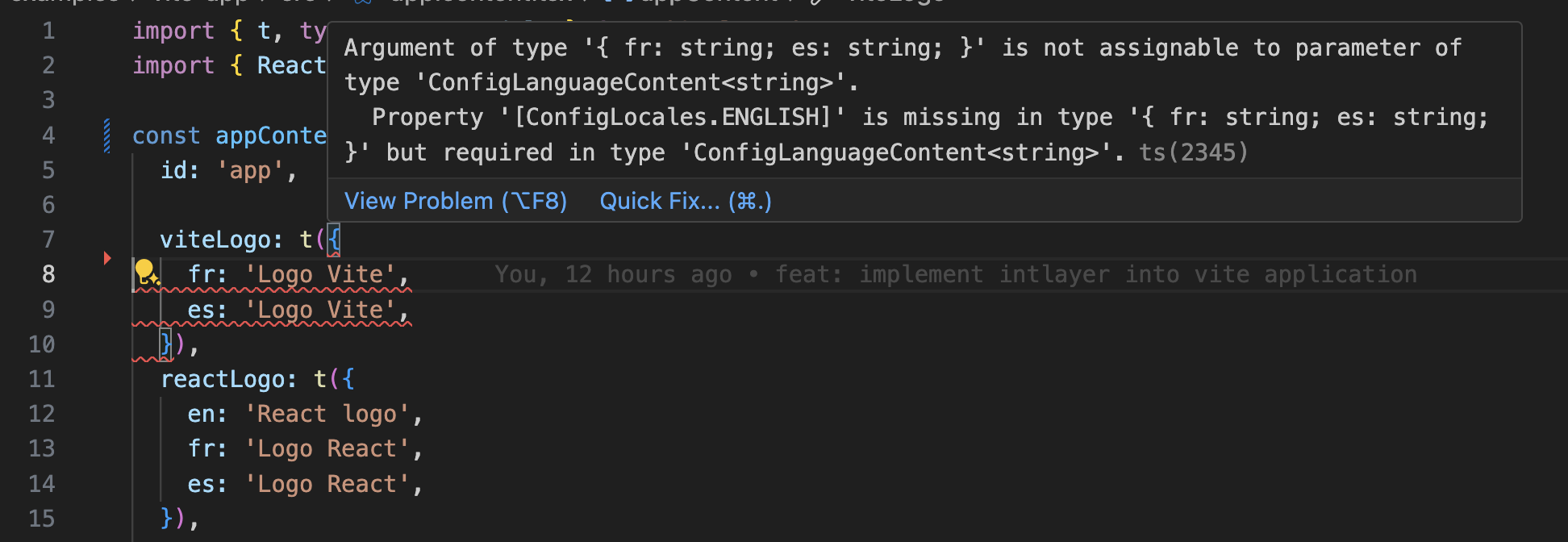
    Intlayer 使用模块扩展来利用 TypeScript,使您的代码库更加健壮。
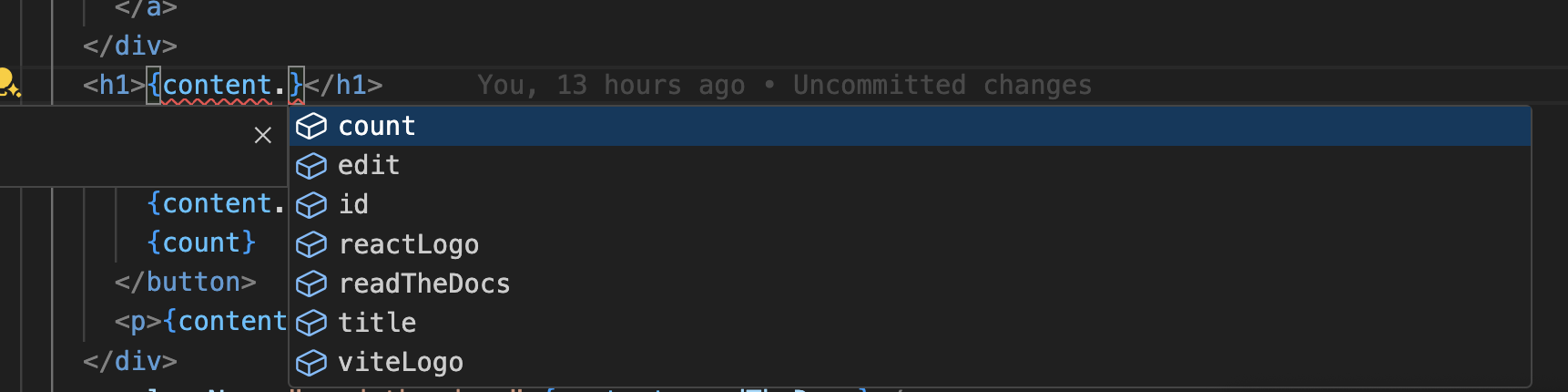
    自动补全

    翻译错误

    确保您的 TypeScript 配置包含自动生成的类型。

    tsconfig.json
    复制代码

    复制代码到剪贴板

    {  // ... 您现有的 TypeScript 配置  "include": [    // ... 您现有的 TypeScript 配置    ".intlayer/**/*.ts", // 包含自动生成的类型  ],}

    Git 配置

    建议忽略 Intlayer 生成的文件。这可以避免将它们提交到您的 Git 仓库。

    为此,您可以将以下说明添加到 .gitignore 文件中:

    bash
    复制代码

    复制代码到剪贴板

    # 忽略 Intlayer 生成的文件.intlayer

    VS Code 扩展

    为了改善使用 Intlayer 的开发体验,您可以安装官方 Intlayer VS Code 扩展。

    从 VS Code Marketplace 安装

    此扩展提供:

    • 翻译键的自动补全。
    • 缺失翻译的实时错误检测。
    • 翻译内容的内联预览。
    • 轻松创建和更新翻译的快速操作。

    有关使用该扩展的更多信息,请参阅 Intlayer VS Code 扩展文档。


    第十五步:提取组件中的内容(可选)

    如果您有现有的代码库,转换数千个文件可能会非常耗时。

    为了简化此过程,Intlayer 提供了 编译器 / 提取器 来转换您的组件并提取内容。

    要进行设置,您可以在 intlayer.config.ts 文件中添加 compiler 部分:

    intlayer.config.ts
    复制代码

    复制代码到剪贴板

    import { type IntlayerConfig } from "intlayer";const config: IntlayerConfig = {  // ... 您的其他配置  compiler: {    /**     * 指示是否应启用编译器。     */    enabled: true,    /**     * 定义输出文件路径     */    output: ({ fileName, extension }) => `./${fileName}${extension}`,    /**     * 指示在转换后是否应保存组件。这样,编译器只需运行一次即可转换应用程序,然后即可将其删除。     */    saveComponents: false,    /**     * 字典键前缀     */    dictionaryKeyPrefix: "",  },};export default config;

    运行提取器以转换组件并提取内容

    bash
    复制代码

    复制代码到剪贴板

    npx intlayer extract

    更新您的 vite.config.ts 以包含 intlayerCompiler 插件:

    vite.config.ts
    复制代码

    复制代码到剪贴板

    import { defineConfig } from "vite";import { intlayer, intlayerCompiler } from "vite-intlayer";export default defineConfig({ plugins: [   intlayer(),   intlayerCompiler(), // 添加编译器插件 ],});

    深入了解

    如果您想了解更多,还可以实现可视化编辑器或使用 CMS 将您的内容外部化。

    Tanstack Start Solid
    Astro和React
    Alt+→

    在此页面

      讨论是匿名的,并会定期审查以解决常见问题。欢迎分享功能想法、对文档的反馈或任何与 Intlayer 相关的内容, 我们会利用这些意见来制定路线图并改进产品。

      npm install intlayer astro-intlayer# 可选:如果添加 React 岛支持npm install react react-dom react-intlayer @astrojs/react
      import { Locales, type IntlayerConfig } from "intlayer";const config: IntlayerConfig = {  internationalization: {    locales: [      Locales.ENGLISH,      Locales.FRENCH,      Locales.SPANISH,      // 您的其他语言    ],    defaultLocale: Locales.ENGLISH,  },};export default config;
      // @ts-checkimport { intlayer } from "astro-intlayer";import { defineConfig } from "astro/config";// https://astro.build/configexport default defineConfig({  integrations: [intlayer()],});
      import { t, type Dictionary } from "intlayer";import type { ReactNode } from "react";const appContent = {  key: "app",  content: {    title: t({      en: "Hello World",      fr: "Bonjour le monde",      es: "Hola mundo",      zh: "你好,世界",    }),  },} satisfies Dictionary;export default appContent;
      ---import {  getIntlayer,  getLocaleFromPath,  getLocalizedUrl,  defaultLocale,  localeMap,  getHTMLTextDir,  type LocalesValues,} from "intlayer";import LocaleSwitcher from "../components/LocaleSwitcher.astro";// Get the current locale from the URL (e.g. /es/about -> 'es')const locale = getLocaleFromPath(Astro.url.pathname) as LocalesValues;// Get the content for the 'app' dictionaryconst { title } = getIntlayer("app", locale);---<!doctype html><html lang={locale} dir={getHTMLTextDir(locale)}>  <head>    <meta charset="utf-8" />    <meta name="viewport" content="width=device-width" />    <link rel="icon" type="image/svg+xml" href="/favicon.svg" />    <title>{title}</title>    <!-- Canonical link: Tells search engines which is the primary version of this page -->    <link      rel="canonical"      href={new URL(getLocalizedUrl(Astro.url.pathname, locale), Astro.site)}    />    <!-- Hreflang: Tell Google about all localized versions -->    {      localeMap(({ locale: mapLocale }) => (        <link          rel="alternate"          hreflang={mapLocale}          href={new URL(            getLocalizedUrl(Astro.url.pathname, mapLocale),            Astro.site          )}        />      ))    }    <!-- x-default: Fallback for users in unmatched languages -->    <link      rel="alternate"      hreflang="x-default"      href={new URL(        getLocalizedUrl(Astro.url.pathname, defaultLocale),        Astro.site      )}    />  </head>  <body>    <header>      <LocaleSwitcher />    </header>    <main>      <h1>{title}</h1>    </main>  </body></html>
      <!-- astro -->---import { getIntlayer } from "intlayer";const { title } = getIntlayer('app');---<h1>{title}</h1>
      {  // ... 您现有的 TypeScript 配置  "include": [    // ... 您现有的 TypeScript 配置    ".intlayer/**/*.ts", // 包含自动生成的类型  ],}
      # 忽略 Intlayer 生成的文件.intlayer
      import { type IntlayerConfig } from "intlayer";const config: IntlayerConfig = {  // ... 您的其他配置  compiler: {    /**     * 指示是否应启用编译器。     */    enabled: true,    /**     * 定义输出文件路径     */    output: ({ fileName, extension }) => `./${fileName}${extension}`,    /**     * 指示在转换后是否应保存组件。这样,编译器只需运行一次即可转换应用程序,然后即可将其删除。     */    saveComponents: false,    /**     * 字典键前缀     */    dictionaryKeyPrefix: "",  },};export default config;
      npx intlayer extract
      import { defineConfig } from "vite";import { intlayer, intlayerCompiler } from "vite-intlayer";export default defineConfig({ plugins: [   intlayer(),   intlayerCompiler(), // 添加编译器插件 ],});