HomeSandboxShowcaseAppDocBlog
    • EnglishEnglish
      EN
    • русскийRussian
      RU
    • 日本語Japanese
      JA
    • françaisFrench
      FR
    • 한국어Korean
      KO
    • 中文Chinese
      ZH
    • españolSpanish
      ES
    • DeutschGerman
      DE
    • العربيةArabic
      AR
    • italianoItalian
      IT
    • British EnglishBritish English
      EN-GB
    • portuguêsPortuguese
      PT
    • हिन्दीHindi
      HI
    • TürkçeTurkish
      TR
    • polskiPolish
      PL
    • IndonesiaIndonesian
      ID
    • Tiếng ViệtVietnamese
      VI
    • українськаUkrainian
      UK
    /
    Filter docs by framework
    Alt+←
    Why Intlayer ?
    Get Started
    Concept
    • How Intlayer Works
    • Configuration
    • TestFillBuildWatchExtractLoginPushPullConfigurationListVersionEditorLiveDebugDoc ReviewDoc TranslateSDK
    • Visual Editor
    • CMS
    • CI/CD Integration
    • TranslationPluralEnumerationConditionGenderInsertionFileNestingMarkdownHTMLFunction Fetching
    • Per Locale File
    • Compiler
    • Auto Fill
    • Testing
    • Bundle Optimization
    Environment
    • Next.js 14 and App Router
      Next.js 15
      Next.js no locale path
      Next.js and Page Router
      Compiler
    • Tanstack Start Solid
    • Astro and React
      Astro and Svelte
      Astro and Vue
      Astro and Solid
      Astro and Preact
      Astro and Lit
      Astro and Vanilla JS
    • React Router v7
      React Router v7 (fs-routes)
      Compiler
    • Nuxt and Vue
    • Vite and Solid
    • SvelteKit
    • Vite and Preact
    • Vite and Vanilla JS
    • Vite and Lit
    • Angular 19 (Webpack)
      Analog
    • React CRA
    • React Native and Expo
    • Express.js
      NestJS
      Fastify
      Hono
      Adonis
    • Lynx and React
    Plugins
    • JSON
    • gettext (.po)
    VS Code Extension
    Agent
    • MCP Server
    • Agent skills
    Releases
    • v8
    • v7
    • v6
    Benchmark
    • Next.js
    • TanStack
    • Vue
    • Solid
    • Svelte
    Blog
    Ask a question
    1. Documentation
    2. Environment
    3. Next.js
    4. Compiler
    Creation:2026-01-10Last update:2026-05-06
    See the application template on GitHub

    This page has an application template available.

    Watch the video tutorial

    This page has a video tutorial available.

    Reference this doc to your favorite AI assistant
    ChatGPT
    Claude
    DeepSeek
    Google AI mode
    Gemini
    Perplexity
    Mistral
    Grok

    Ask your question and get a summary of the document by referencing this page and the AI provider of your choice

    Version History

    1. "Update Solid useIntlayer API usage to direct property access"
      v8.9.004/05/2026
    2. "Update compiler options, add FilePathPattern support"
      v8.2.009/03/2026
    3. "Initial release"
      v8.1.623/02/2026

    The content of this page was translated using an AI.

    See the last version of the original content in English
    Edit this doc

    If you have an idea for improving this documentation, please feel free to contribute by submitting a pull request on GitHub.

    GitHub link to the documentation
    Copy

    Copy doc Markdown to clipboard

    How to make multilingual (i18n) an existing Next.js application afterward (i18n guide 2026)

    www.youtube.com
    ide.intlayer.org

    See Application Template on GitHub.

    Table of Contents

    Why is it hard to internationalise an existing application?

    If you've ever tried to add multiple languages to an app that was built for just one, you know the pain. It's not just "hard", it's tedious. You have to comb through every single file, hunt down every string of text, and move them into separate dictionary files.

    Then comes the risky part: replacing all that text with code hooks without breaking your layout or logic. It's the kind of work that halts new feature development for weeks and feels like endless refactoring.

    What is the Intlayer Compiler?

    The Intlayer Compiler was built to skip that manual grunt work. Instead of you manually extracting strings, the compiler does it for you. It scans your code, finds the text, and uses AI to generate the dictionaries behind the scenes. Then, it modifies your code during the build to inject the necessary i18n hooks. Basically, you keep writing your app as if it's single-language, and the compiler handles the multilingual transformation automatically.

    Doc Compiler: /en-GB/doc/compiler

    Limitations

    Because the compiler performs code analysis and transformation (inserting hooks and generating dictionaries) at compile time, it can slow down the build process of your application.

    To mitigate this impact during development, you can configure the compiler to run in 'build-only' mode or disable it when not needed.


    Step-by-Step Guide to Set Up Intlayer in a Next.js Application

    Step 1: Install Dependencies

    Install the necessary packages using npm:

    bash
    Copy code

    Copy the code to the clipboard

    npm install intlayer next-intlayernpm install @intlayer/babel --save-devnpx intlayer init
    • intlayer

      The core package that provides internationalisation tools for configuration management, translation, content declaration, transpilation, and CLI commands.

    • next-intlayer

      The package that integrates Intlayer with Next.js. It provides context providers and hooks for Next.js internationalisation. Additionally, it includes the Next.js plugin for integrating Intlayer with Webpack or Turbopack, as well as proxy for detecting the user's preferred locale, managing cookies, and handling URL redirection.

    Step 2: Configure Your Project

    Create a config file to configure the languages of your application:

    intlayer.config.ts
    Copy code

    Copy the code to the clipboard

    import { Locales, type IntlayerConfig } from "intlayer";const config: IntlayerConfig = {  internationalization: {    locales: [Locales.ENGLISH, Locales.FRENCH],    defaultLocale: Locales.FRENCH,  },  routing: {    mode: "search-params",  },  compiler: {    /**     * Set to 'build-only' to skip the compiler during development and speed up start times.     */    enabled: true,    /**     * Output directory for the optimized dictionaries.     */    output: ({ locale, key }) => `compiler/${locale}/${key}.json`,    /**     * Inset only content in generated file, without key.     */    noMetadata: false,    /**     * Dictionary key prefix     */    dictionaryKeyPrefix: "", // Remove base prefix  },  ai: {    provider: "openai",    model: "gpt-5-mini",    apiKey: process.env.OPEN_AI_API_KEY,    applicationContext: "This app is a map app",  },};export default config;
    Note: Ensure you have your OPEN_AI_API_KEY set in your environment variables.
    Through this configuration file, you can set up localised URLs, proxy redirection, cookie names, the location and extension of your content declarations, disable Intlayer logs in the console, and more. For a complete list of available parameters, refer to the configuration documentation.

    Step 3: Integrate Intlayer in Your Next.js Configuration

    Configure your Next.js setup to use Intlayer:

    next.config.ts
    Copy code

    Copy the code to the clipboard

    import type { NextConfig } from "next";import { withIntlayer } from "next-intlayer/server";const nextConfig: NextConfig = {  /* config options here */};export default withIntlayer(nextConfig);
    The withIntlayer() Next.js plugin is used to integrate Intlayer with Next.js. It ensures the building of content declaration files and monitors them in development mode. It defines Intlayer environment variables within the Webpack or Turbopack environments. Additionally, it provides aliases to optimise performance and ensures compatibility with server components.

    Step 4: Configure Babel

    The Intlayer compiler requires Babel to extract and optimise your content. Update your babel.config.js (or babel.config.json) to include the Intlayer plugins:

    babel.config.js
    Copy code

    Copy the code to the clipboard

    const {  intlayerExtractBabelPlugin,  intlayerOptimizeBabelPlugin,  getExtractPluginOptions,  getOptimizePluginOptions,} = require("@intlayer/babel");module.exports = {  presets: ["next/babel"],  plugins: [    [intlayerExtractBabelPlugin, getExtractPluginOptions()],    [intlayerOptimizeBabelPlugin, getOptimizePluginOptions()],  ],};

    Step 5: Detect Locale in your pages

    Remove everything from RootLayout and replace it with the following code:

    src/app/layout.tsx
    Copy code

    Copy the code to the clipboard

    import type { Metadata } from "next";import type { ReactNode } from "react";import "./globals.css";import { IntlayerClientProvider, LocalPromiseParams } from "next-intlayer";import { getHTMLTextDir, getIntlayer } from "intlayer";import { getLocale } from "next-intlayer/server";export { generateStaticParams } from "next-intlayer";export const generateMetadata = async (): Promise<Metadata> => {  const locale = await getLocale();  const { title, description, keywords } = getIntlayer("metadata", locale);  return {    title,    description,    keywords,  };};const RootLayout = async ({  children,}: Readonly<{  children: ReactNode;}>) => {  const locale = await getLocale();  return (    <html lang={locale} dir={getHTMLTextDir(locale)}>      <IntlayerClientProvider defaultLocale={locale}>        <body>{children}</body>      </IntlayerClientProvider>    </html>  );};export default RootLayout;

    Step 6: Compile your components

    With the compiler enabled, you no longer need to manually declare content dictionaries (like .content.ts files).

    Instead, you can write your content directly in your code as strings. Intlayer will analyze your code, generate the translations using the configured AI provider, and replace the strings with localised content at compile time.

    Just write your components with hardcoded strings in your default locale. The compiler handles the rest.

    Example of how your page might look:

    src/app/page.tsx
    Copy code

    Copy the code to the clipboard

    import type { FC } from "react";import { IntlayerServerProvider } from "next-intlayer/server";import { getLocale } from "next-intlayer/server";const PageContent: FC = () => {return (  <>    <p>Get started by editing</p>    <code>src/app/page.tsx</code>  </>);};export default async function Page() {const locale = await getLocale();return (  <IntlayerServerProvider locale={locale}>    <PageContent />  </IntlayerServerProvider>);}
    i18n/page-content.content.tsx
    Copy code

    Copy the code to the clipboard

    {key: "page-content",content: {  nodeType: "translation",  translation: {    en: {      getStartedByEditing: "Get started by editing",    },    fr: {      getStartedByEditing: "Commencez par éditer",    },    es: {      getStartedByEditing: "Comience editando",    },  }}}
    src/app/page.tsx
    Copy code

    Copy the code to the clipboard

    import { type FC } from "react";import { IntlayerServerProvider, useIntlayer } from "next-intlayer/server";import { getLocale } from "next-intlayer/server";const PageContent: FC = () => {const content = useIntlayer("page-content");return (  <>    <p>{content.getStartedByEditing}</p>    <code>src/app/page.tsx</code>  </>);};export default async function Page() {const locale = await getLocale();return (  <IntlayerServerProvider locale={locale}>    <PageContent />  </IntlayerServerProvider>);}
    • IntlayerClientProvider is used to provide the locale to client-side components.
    • IntlayerServerProvider is used to provide the locale to the server children.

      Layout and page cannot share a common server context because the server context system is based on a per-request data store (via React's cache mechanism), causing each "context" to be re-created for different segments of the application. Placing the provider in a shared layout would break this isolation, preventing the correct propagation of the server context values to your server components.

    (Optional) Step 7: Fill missing translation

    Intlayer provide a CLI tool to help you fill missing translations. You can use the intlayer command to test and fill missing translations from your code.

    bash
    Copy code

    Copy the code to the clipboard

    npx intlayer test         # Test if there is missing translations
    bash
    Copy code

    Copy the code to the clipboard

    npx intlayer fill         # Fill missing translations
    For more details, refer to the CLI documentation

    (Optional) Step 8: Configure Proxy for Locale Detection

    Set up proxy to detect the user's preferred locale:

    src/proxy.ts
    Copy code

    Copy the code to the clipboard

    export { intlayerProxy as proxy } from "next-intlayer/proxy";export const config = {  matcher:    "/((?!api|static|assets|robots|sitemap|sw|service-worker|manifest|.*\\..*|_next).*)",};
    The intlayerProxy is used to detect the user's preferred locale and redirect them to the appropriate URL as specified in the configuration. Additionally, it enables saving the user's preferred locale in a cookie.

    (Optional) Step 8: Change the language of your content

    To change the language of your content in Next.js, the recommended way is to use the Link component to redirect users to the appropriate localised page. The Link component enables prefetching of the page, which helps avoid a full page reload.

    src/components/localeSwitcher/LocaleSwitcher.tsx
    Copy code

    Copy the code to the clipboard

    "use client";import type { FC } from "react";import { Locales, getHTMLTextDir, getLocaleName } from "intlayer";import { useLocale } from "next-intlayer";export const LocaleSwitcher: FC = () => {  const { locale, availableLocales, setLocale } = useLocale();  return (    <div>      <button popoverTarget="localePopover">{getLocaleName(locale)}</button>      <div id="localePopover" popover="auto">        {availableLocales.map((localeItem) => (          <button            key={localeItem}            aria-current={locale === localeItem ? "page" : undefined}            onClick={() => setLocale(localeItem)}          >            <span>              {/* Locale - e.g. EN */}              {localeItem}            </span>            <span>              {/* Language in its own Locale - e.g. Français */}              {getLocaleName(localeItem, locale)}            </span>            <span dir={getHTMLTextDir(localeItem)} lang={localeItem}>              {/* Language in current Locale - e.g. Francés with current locale set to Locales.SPANISH */}              {getLocaleName(localeItem)}            </span>            <span dir="ltr" lang={Locales.ENGLISH_UNITED_KINGDOM}>              {/* Language in English - e.g. French */}              {getLocaleName(localeItem, Locales.ENGLISH_UNITED_KINGDOM)}            </span>          </button>        ))}      </div>    </div>  );};
    An alternative way is to use the setLocale function provided by the useLocale hook. This function will not allow prefetching the page. See the useLocale hook documentation for more details.

    (Optional) Step 10: Optimise your bundle size

    When using next-intlayer, dictionaries are included in the bundle for every page by default. To optimise bundle size, Intlayer provides an optional SWC plugin that intelligently replace useIntlayer calls using macros. This ensures dictionaries are only included in bundles for pages that actually use them.

    To enable this optimisation, install the @intlayer/swc package. Once installed, next-intlayer will automatically detect and use the plugin:

    bash
    Copy code

    Copy the code to the clipboard

    npm install @intlayer/swc --save-dev
    Note: This optimisation is only available for Next.js 13 and above.
    Note: This package is not installed by default because SWC plugins are still experimental on Next.js. It may change in the future.
    Note: If you set the option as importMode: 'dynamic' or importMode: 'fetch' (in the dictionary configuration), it will rely on Suspense, so you will have to wrap your useIntlayer calls in a Suspense boundary. That means, you will not be able to use the useIntlayer directly at the top level of your Page / Layout component.

    Configure TypeScript

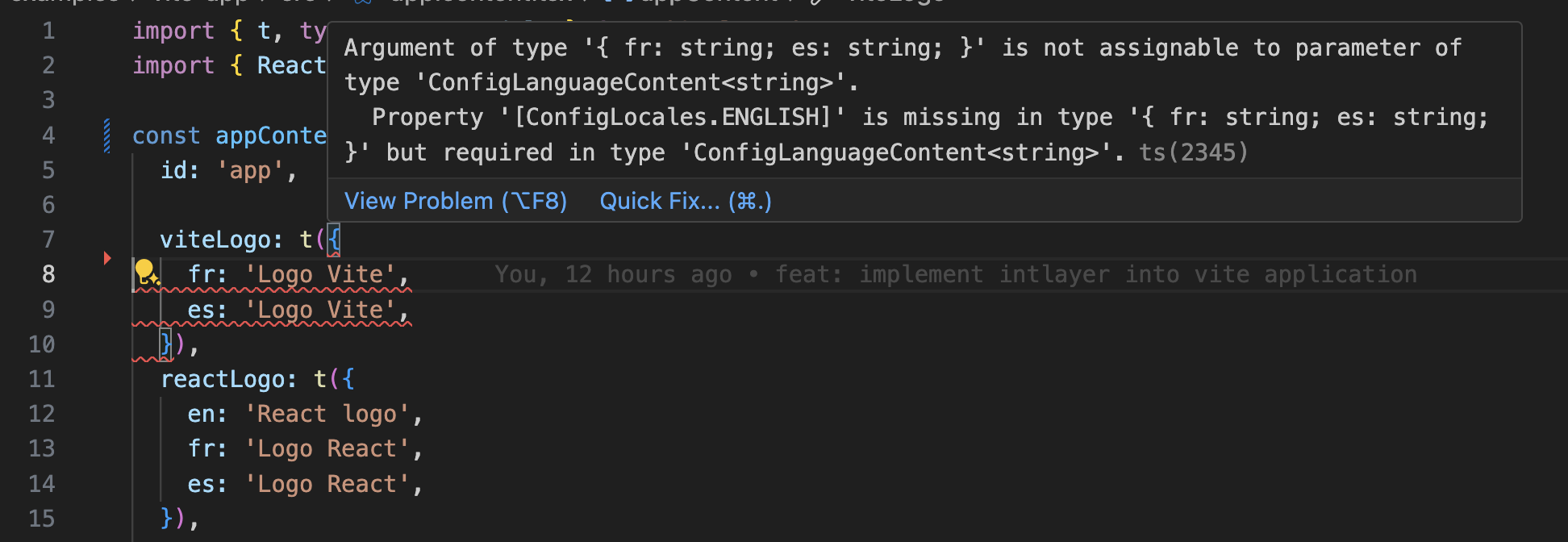
    Intlayer use module augmentation to get benefits of TypeScript and make your codebase stronger.
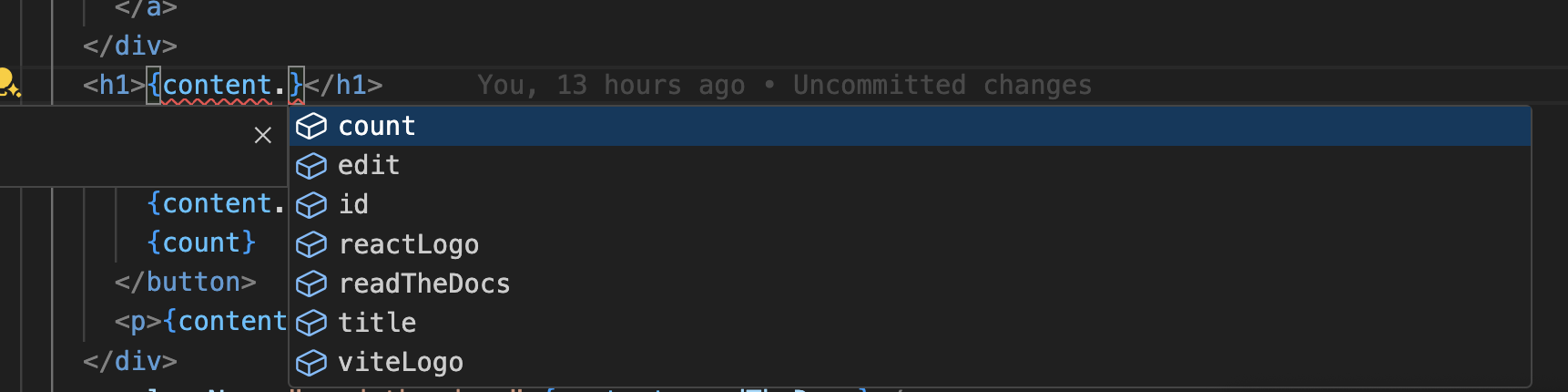
    Autocompletion

    Translation error

    Ensure your TypeScript configuration includes the autogenerated types.

    tsconfig.json
    Copy code

    Copy the code to the clipboard

    {  // ... Your existing TypeScript configurations  "include": [    // ... Your existing TypeScript configurations    ".intlayer/**/*.ts", // Include the auto-generated types  ],}

    Git Configuration

    It is recommended to ignore the files generated by Intlayer. This allows you to avoid committing them to your Git repository.

    To do this, you can add the following instructions to your .gitignore file:

    .gitignore
    Copy code

    Copy the code to the clipboard

    # Ignore the files generated by Intlayer.intlayer

    VS Code Extension

    To improve your development experience with Intlayer, you can install the official Intlayer VS Code Extension.

    Install from the VS Code Marketplace

    This extension provides:

    • Autocompletion for translation keys.
    • Real-time error detection for missing translations.
    • Inline previews of translated content.
    • Quick actions to easily create and update translations.

    For more details on how to use the extension, refer to the Intlayer VS Code Extension documentation.

    Go Further

    To go further, you can implement the visual editor or externalise your content using the CMS.

    Next.js and Page Router
    Tanstack Start
    Alt+→

    On this page

      Discussions are anonymous and regularly reviewed to address common issues. Feel free to share feature ideas, feedback on the documentation, or anything related to Intlayer, we use this input to shape our roadmap and improve the product.

      npm install intlayer next-intlayernpm install @intlayer/babel --save-devnpx intlayer init
      import { Locales, type IntlayerConfig } from "intlayer";const config: IntlayerConfig = {  internationalization: {    locales: [Locales.ENGLISH, Locales.FRENCH],    defaultLocale: Locales.FRENCH,  },  routing: {    mode: "search-params",  },  compiler: {    /**     * Set to 'build-only' to skip the compiler during development and speed up start times.     */    enabled: true,    /**     * Output directory for the optimized dictionaries.     */    output: ({ locale, key }) => `compiler/${locale}/${key}.json`,    /**     * Inset only content in generated file, without key.     */    noMetadata: false,    /**     * Dictionary key prefix     */    dictionaryKeyPrefix: "", // Remove base prefix  },  ai: {    provider: "openai",    model: "gpt-5-mini",    apiKey: process.env.OPEN_AI_API_KEY,    applicationContext: "This app is a map app",  },};export default config;
      import type { NextConfig } from "next";import { withIntlayer } from "next-intlayer/server";const nextConfig: NextConfig = {  /* config options here */};export default withIntlayer(nextConfig);
      const {  intlayerExtractBabelPlugin,  intlayerOptimizeBabelPlugin,  getExtractPluginOptions,  getOptimizePluginOptions,} = require("@intlayer/babel");module.exports = {  presets: ["next/babel"],  plugins: [    [intlayerExtractBabelPlugin, getExtractPluginOptions()],    [intlayerOptimizeBabelPlugin, getOptimizePluginOptions()],  ],};
      import type { Metadata } from "next";import type { ReactNode } from "react";import "./globals.css";import { IntlayerClientProvider, LocalPromiseParams } from "next-intlayer";import { getHTMLTextDir, getIntlayer } from "intlayer";import { getLocale } from "next-intlayer/server";export { generateStaticParams } from "next-intlayer";export const generateMetadata = async (): Promise<Metadata> => {  const locale = await getLocale();  const { title, description, keywords } = getIntlayer("metadata", locale);  return {    title,    description,    keywords,  };};const RootLayout = async ({  children,}: Readonly<{  children: ReactNode;}>) => {  const locale = await getLocale();  return (    <html lang={locale} dir={getHTMLTextDir(locale)}>      <IntlayerClientProvider defaultLocale={locale}>        <body>{children}</body>      </IntlayerClientProvider>    </html>  );};export default RootLayout;
      import type { FC } from "react";import { IntlayerServerProvider } from "next-intlayer/server";import { getLocale } from "next-intlayer/server";const PageContent: FC = () => {return (  <>    <p>Get started by editing</p>    <code>src/app/page.tsx</code>  </>);};export default async function Page() {const locale = await getLocale();return (  <IntlayerServerProvider locale={locale}>    <PageContent />  </IntlayerServerProvider>);}
      {key: "page-content",content: {  nodeType: "translation",  translation: {    en: {      getStartedByEditing: "Get started by editing",    },    fr: {      getStartedByEditing: "Commencez par éditer",    },    es: {      getStartedByEditing: "Comience editando",    },  }}}
      import { type FC } from "react";import { IntlayerServerProvider, useIntlayer } from "next-intlayer/server";import { getLocale } from "next-intlayer/server";const PageContent: FC = () => {const content = useIntlayer("page-content");return (  <>    <p>{content.getStartedByEditing}</p>    <code>src/app/page.tsx</code>  </>);};export default async function Page() {const locale = await getLocale();return (  <IntlayerServerProvider locale={locale}>    <PageContent />  </IntlayerServerProvider>);}
      npx intlayer test         # Test if there is missing translations
      npx intlayer fill         # Fill missing translations
      export { intlayerProxy as proxy } from "next-intlayer/proxy";export const config = {  matcher:    "/((?!api|static|assets|robots|sitemap|sw|service-worker|manifest|.*\\..*|_next).*)",};
      "use client";import type { FC } from "react";import { Locales, getHTMLTextDir, getLocaleName } from "intlayer";import { useLocale } from "next-intlayer";export const LocaleSwitcher: FC = () => {  const { locale, availableLocales, setLocale } = useLocale();  return (    <div>      <button popoverTarget="localePopover">{getLocaleName(locale)}</button>      <div id="localePopover" popover="auto">        {availableLocales.map((localeItem) => (          <button            key={localeItem}            aria-current={locale === localeItem ? "page" : undefined}            onClick={() => setLocale(localeItem)}          >            <span>              {/* Locale - e.g. EN */}              {localeItem}            </span>            <span>              {/* Language in its own Locale - e.g. Français */}              {getLocaleName(localeItem, locale)}            </span>            <span dir={getHTMLTextDir(localeItem)} lang={localeItem}>              {/* Language in current Locale - e.g. Francés with current locale set to Locales.SPANISH */}              {getLocaleName(localeItem)}            </span>            <span dir="ltr" lang={Locales.ENGLISH_UNITED_KINGDOM}>              {/* Language in English - e.g. French */}              {getLocaleName(localeItem, Locales.ENGLISH_UNITED_KINGDOM)}            </span>          </button>        ))}      </div>    </div>  );};
      npm install @intlayer/swc --save-dev
      {  // ... Your existing TypeScript configurations  "include": [    // ... Your existing TypeScript configurations    ".intlayer/**/*.ts", // Include the auto-generated types  ],}
      # Ignore the files generated by Intlayer.intlayer