HomeSandboxShowcaseAppDocBlog
    • EnglishEnglish
      EN
    • русскийRussian
      RU
    • 日本語Japanese
      JA
    • françaisFrench
      FR
    • 한국어Korean
      KO
    • 中文Chinese
      ZH
    • españolSpanish
      ES
    • DeutschGerman
      DE
    • العربيةArabic
      AR
    • italianoItalian
      IT
    • British EnglishBritish English
      EN-GB
    • portuguêsPortuguese
      PT
    • हिन्दीHindi
      HI
    • TürkçeTurkish
      TR
    • polskiPolish
      PL
    • IndonesiaIndonesian
      ID
    • Tiếng ViệtVietnamese
      VI
    • українськаUkrainian
      UK
    /
    Filter docs by framework
    Alt+←
    Why Intlayer ?
    Get Started
    Concept
    • How Intlayer Works
    • Configuration
    • TestFillBuildWatchExtractLoginPushPullConfigurationListVersionEditorLiveDebugDoc ReviewDoc TranslateSDK
    • Visual Editor
    • CMS
    • CI/CD Integration
    • TranslationPluralEnumerationConditionGenderInsertionFileNestingMarkdownHTMLFunction Fetching
    • Per Locale File
    • Compiler
    • Auto Fill
    • Testing
    • Bundle Optimization
    Environment
    • Next.js 14 and App Router
      Next.js 15
      Next.js no locale path
      Next.js and Page Router
      Compiler
    • Tanstack Start Solid
    • Astro and React
      Astro and Svelte
      Astro and Vue
      Astro and Solid
      Astro and Preact
      Astro and Lit
      Astro and Vanilla JS
    • React Router v7
      React Router v7 (fs-routes)
      Compiler
    • Nuxt and Vue
    • Vite and Solid
    • SvelteKit
    • Vite and Preact
    • Vite and Vanilla JS
    • Vite and Lit
    • Angular 19 (Webpack)
      Analog
    • React CRA
    • React Native and Expo
    • Express.js
      NestJS
      Fastify
      Hono
      Adonis
    • Lynx and React
    Plugins
    • JSON
    • gettext (.po)
    VS Code Extension
    Agent
    • MCP Server
    • Agent skills
    Releases
    • v8
    • v7
    • v6
    Benchmark
    • Next.js
    • TanStack
    • Vue
    • Solid
    • Svelte
    Blog
    Ask a question
    1. Documentation
    2. Environment
    3. Astro
    4. Preact
    Creation:2026-04-24Last update:2026-05-06
    See the application template on GitHub

    This page has an application template available.

    See the showcase application

    This page links to a live demo of the template.

    Reference this doc to your favorite AI assistant
    ChatGPT
    Claude
    DeepSeek
    Google AI mode
    Gemini
    Perplexity
    Mistral
    Grok

    Ask your question and get a summary of the document by referencing this page and the AI provider of your choice

    Version History

    1. "Update Solid useIntlayer API usage to direct property access"
      v8.9.05/4/2026
    2. "Initial documentation for Astro + Preact"
      v8.7.74/24/2026
    Edit this doc

    If you have an idea for improving this documentation, please feel free to contribute by submitting a pull request on GitHub.

    GitHub link to the documentation
    Copy

    Copy doc Markdown to clipboard

    Translate your Astro + Preact website using Intlayer | Internationalization (i18n)

    ide.intlayer.org
    intlayer-astro-template.vercel.app

    Table of Contents

    What is Intlayer?

    Intlayer is an innovative, open-source internationalization (i18n) library designed to simplify multilingual support in modern web applications.

    With Intlayer, you can:

    • Easily manage translations using declarative dictionaries at the component level.
    • Dynamically localize metadata, routes, and content.
    • Ensure TypeScript support with autogenerated types, improving autocompletion and error detection.
    • Benefit from advanced features, like dynamic locale detection and switching.

    Step-by-Step Guide to Set Up Intlayer in Astro + Preact

    See Application Template on GitHub.

    Step 1: Install Dependencies

    Install the necessary packages using your package manager:

    bash
    Copy code

    Copy the code to the clipboard

    npm install intlayer astro-intlayer preact preact-intlayer @astrojs/preactnpx intlayer init
    • intlayer The core package that provides internationalization tools for configuration management, translation, content declaration, transpilation, and CLI commands.

    • astro-intlayer Includes the Astro integration plugin for integrating Intlayer with the Vite bundler, as well as middleware for detecting the user's preferred locale, managing cookies, and handling URL redirection.

    • preact The core Preact package - a fast, lightweight alternative to React.

    • preact-intlayer The package that integrates Intlayer with Preact applications. It provides IntlayerProvider, useIntlayer, and useLocale hooks for Preact internationalization.

    • @astrojs/preact The official Astro integration that enables Preact component islands.

    Step 2: Configuration of your project

    Create a config file to configure the languages of your application:

    intlayer.config.ts
    Copy code

    Copy the code to the clipboard

    import { Locales, type IntlayerConfig } from "intlayer";const config: IntlayerConfig = {  internationalization: {    locales: [      Locales.ENGLISH,      Locales.FRENCH,      Locales.SPANISH,      // Your other locales    ],    defaultLocale: Locales.ENGLISH,  },};export default config;
    Through this configuration file, you can set up localized URLs, middleware redirection, cookie names, the location and extension of your content declarations, disable Intlayer logs in the console, and more. For a complete list of available parameters, refer to the configuration documentation.

    Step 3: Integrate Intlayer in Your Astro Configuration

    Add the intlayer plugin and the Preact integration into your configuration.

    astro.config.ts
    Copy code

    Copy the code to the clipboard

    // @ts-checkimport { intlayer } from "astro-intlayer";import preact from "@astrojs/preact";import { defineConfig } from "astro/config";// https://astro.build/configexport default defineConfig({  integrations: [intlayer(), preact()],});
    The intlayer() Astro integration plugin is used to integrate Intlayer with Astro. It ensures the building of content declaration files and monitors them in development mode. It defines Intlayer environment variables within the Astro application. Additionally, it provides aliases to optimize performance.
    The preact() integration enables Preact component islands via client:only="preact".

    Step 4: Declare Your Content

    Create and manage your content declarations to store translations:

    src/app.content.tsx
    Copy code

    Copy the code to the clipboard

    import { t, type Dictionary } from "intlayer";import type { ComponentChildren } from "preact";const appContent = {  key: "app",  content: {    title: t({      en: "Hello World",      fr: "Bonjour le monde",      es: "Hola mundo",    }),  },} satisfies Dictionary;export default appContent;
    Your content declarations can be defined anywhere in your application as soon they are included into the contentDir directory (by default, ./src). And match the content declaration file extension (by default, .content.{json,ts,tsx,js,jsx,mjs,cjs}).
    For more details, refer to the content declaration documentation.
    If your content file includes TSX code, you might need to import import { h } from "preact"; or ensure your JSX pragma is correctly configured for Preact.

    Step 5: Use your content in Astro

    You can consume dictionaries directly in .astro files using the core helpers exported by intlayer. You should also add SEO metadata like hreflang and canonical links to each page, and embed the Preact island for interactive client-side content.

    src/pages/[...locale]/index.astro
    Copy code

    Copy the code to the clipboard

    ---import {  getIntlayer,  getLocaleFromPath,  getLocalizedUrl,  getPrefix,  localeMap,  defaultLocale,  getHTMLTextDir,  type LocalesValues,} from "intlayer";import { PreactIsland } from "../../components/preact/PreactIsland";export const getStaticPaths = () => {  return localeMap(({ locale }) => ({    params: { locale: getPrefix(locale).localePrefix },  }));};const locale = getLocaleFromPath(Astro.url.pathname) as LocalesValues;const { title } = getIntlayer("app", locale);---<!doctype html><html lang={locale} dir={getHTMLTextDir(locale)}>  <head>    <meta charset="utf-8" />    <meta name="viewport" content="width=device-width" />    <link rel="icon" type="image/svg+xml" href="/favicon.svg" />    <title>{title}</title>    <!-- Canonical link: Tells search engines which is the primary version of this page -->    <link      rel="canonical"      href={new URL(getLocalizedUrl(Astro.url.pathname, locale), Astro.site)}    />    <!-- Hreflang: Tell Google about all localized versions -->    {      localeMap(({ locale: mapLocale }) => (        <link          rel="alternate"          hreflang={mapLocale}          href={new URL(            getLocalizedUrl(Astro.url.pathname, mapLocale),            Astro.site          )}        />      ))    }    <!-- x-default: Fallback for users in unmatched languages -->    <link      rel="alternate"      hreflang="x-default"      href={new URL(        getLocalizedUrl(Astro.url.pathname, defaultLocale),        Astro.site      )}    />  </head>  <body>    <!-- The Preact island renders all interactive content, including the locale switcher -->    <PreactIsland locale={locale} client:only="preact" />  </body></html>
    If you want to use your content in a string attribute, such as alt, title, href, aria-label, etc., you can use the value of the function, like:
    html
    Copy code

    Copy the code to the clipboard

    <img src="{content.image.src.value}" alt="{content.image.value}" /><img src="{content.image.src.toString()}" alt="{content.image.toString()}" /><img src="{String(content.image.src)}" alt="{String(content.image)}" />

    Note on Routing Configuration: The directory structure you use depends on the middleware.routing setting in your intlayer.config.ts:

    • prefix-no-default (default): Keeps the default locale at the root (no prefix) and prefixes others. Use [...locale] to catch all cases.
    • prefix-all: All URLs are prefixed with the locale. You can use standard [locale] if you don't need to handle the root separately.
    • search-param or no-prefix: No locale folder is needed. The locale is handled via search parameters or cookies.

    Step 6: Create the Preact Island component

    Create the island component that wraps your Preact app and receives the server-detected locale:

    src/components/preact/PreactIsland.tsx
    Copy code

    Copy the code to the clipboard

    /** @jsxImportSource preact */import { IntlayerProvider, useIntlayer } from "preact-intlayer";import { type LocalesValues } from "intlayer";import type { FunctionalComponent } from "preact";import { LocaleSwitcher } from "./LocaleSwitcher";const App: FunctionalComponent = () => {  const { title } = useIntlayer("app");  return (    <div>      <h1>{title}</h1>      <LocaleSwitcher />    </div>  );};export const PreactIsland: FunctionalComponent<{ locale: LocalesValues }> = ({  locale,}) => (  <IntlayerProvider locale={locale}>    <App />  </IntlayerProvider>);
    The locale prop is passed from the Astro page (server-detected) into IntlayerProvider, which makes it the initial locale for all Preact hooks in the tree.
    Note: In Preact, use class instead of className for HTML attributes.

    Step 7: Add a Locale Switcher

    Create a LocaleSwitcher Preact component that reads the available locales and navigates to the localized URL when the user picks a new language:

    src/components/preact/LocaleSwitcher.tsx
    Copy code

    Copy the code to the clipboard

    /** @jsxImportSource preact */import { useLocale } from "preact-intlayer";import { getLocalizedUrl, getLocaleName, type LocalesValues } from "intlayer";import type { FunctionalComponent } from "preact";export const LocaleSwitcher: FunctionalComponent = () => {  const { locale, availableLocales, setLocale } = useLocale({    onLocaleChange: (newLocale: LocalesValues) => {      // Navigate to the localized URL on locale change      window.location.href = getLocalizedUrl(        window.location.pathname,        newLocale      );    },  });  return (    <div class="locale-switcher">      <span class="switcher-label">Switch locale:</span>      <div class="locale-buttons">        {availableLocales.map((localeItem) => (          <button            key={localeItem}            onClick={() => setLocale(localeItem)}            class={`locale-btn ${localeItem === locale ? "active" : ""}`}            disabled={localeItem === locale}          >            <span class="ls-own-name">{getLocaleName(localeItem)}</span>            <span class="ls-current-name">              {getLocaleName(localeItem, locale)}            </span>            <span class="ls-code">{localeItem.toUpperCase()}</span>          </button>        ))}      </div>    </div>  );};

    Note on Persistence: Using onLocaleChange to redirect via window.location.href ensures that the new locale URL is visited, allowing Intlayer middleware to set the locale cookie and remember the user's preference on future visits.

    The LocaleSwitcher must be rendered inside IntlayerProvider - use it inside your island component (as shown in Step 6).

    Step 8: Sitemap and Robots.txt

    Intlayer provides utilities to generate localized sitemaps and robots.txt files dynamically.

    Sitemap

    Intlayer comes with a built-in sitemap generator to help you create a sitemap for your application easily. It handles localized routes and adds the necessary metadata for search engines.

    The Intlayer generated sitemap supports the xhtml:link namespace (Hreflang XML Extensions). Unlike the default sitemap generators that only list raw URLs, Intlayer automatically creates the required bidirectional links between all language versions of a page (e.g., /about, /about?lang=fr, and /about?lang=es). This ensures search engines correctly index and serve the right language version to the right audience.

    Create src/pages/sitemap.xml.ts to generate a sitemap that includes all your localized routes.

    src/pages/sitemap.xml.ts
    Copy code

    Copy the code to the clipboard

    import type { APIRoute } from "astro";import { generateSitemap, type SitemapUrlEntry } from "intlayer";const pathList: SitemapUrlEntry[] = [  { path: "/", changefreq: "daily", priority: 1.0 },  { path: "/about", changefreq: "monthly", priority: 0.7 },];const SITE_URL = import.meta.env.SITE ?? "http://localhost:4321";export const GET: APIRoute = async ({ site }) => {  const xmlOutput = generateSitemap(pathList, { siteUrl: SITE_URL });  return new Response(xmlOutput, {    headers: { "Content-Type": "application/xml" },  });};

    Robots.txt

    Create src/pages/robots.txt.ts to control search engine crawling.

    src/pages/robots.txt.ts
    Copy code

    Copy the code to the clipboard

    import type { APIRoute } from "astro";import { getMultilingualUrls } from "intlayer";const getAllMultilingualUrls = (urls: string[]) =>  urls.flatMap((url) => Object.values(getMultilingualUrls(url)) as string[]);const disallowedPaths = getAllMultilingualUrls(["/admin", "/private"]);export const GET: APIRoute = ({ site }) => {  const robotsTxt = [    "User-agent: *",    "Allow: /",    ...disallowedPaths.map((path) => `Disallow: ${path}`),    "",    `Sitemap: ${new URL("/sitemap.xml", site).href}`,  ].join("\n");  return new Response(robotsTxt, {    headers: { "Content-Type": "text/plain" },  });};

    Configure TypeScript

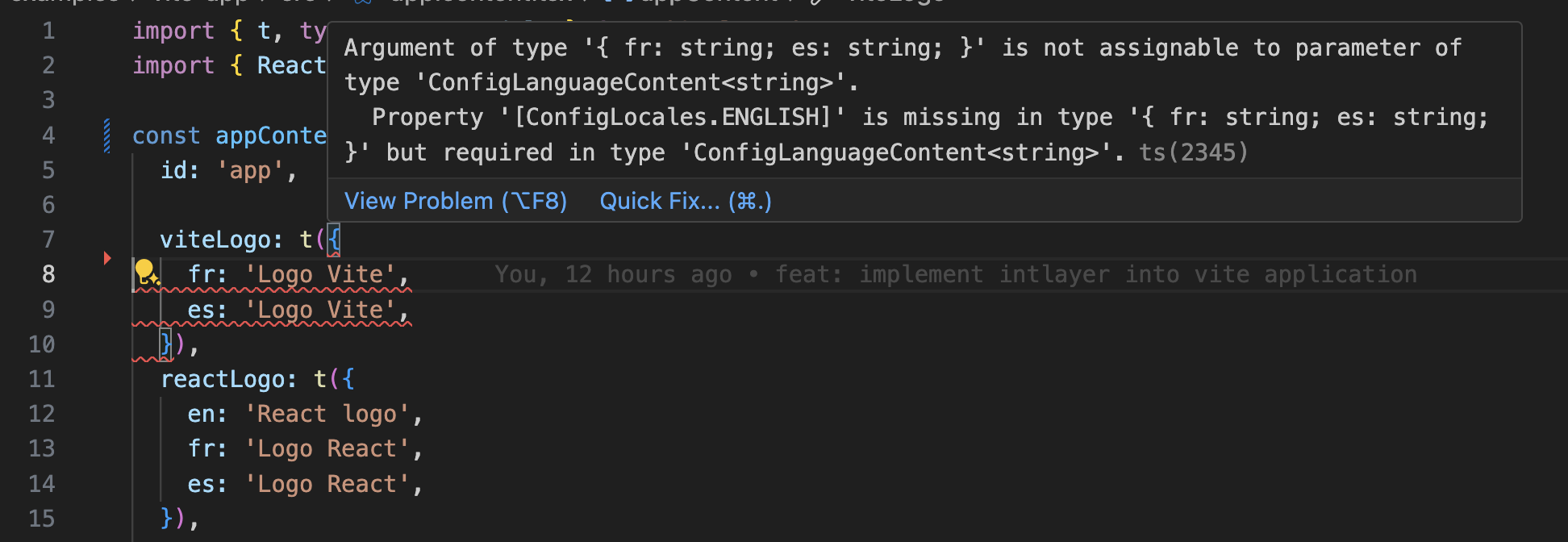
    Intlayer use module augmentation to get benefits of TypeScript and make your codebase stronger.
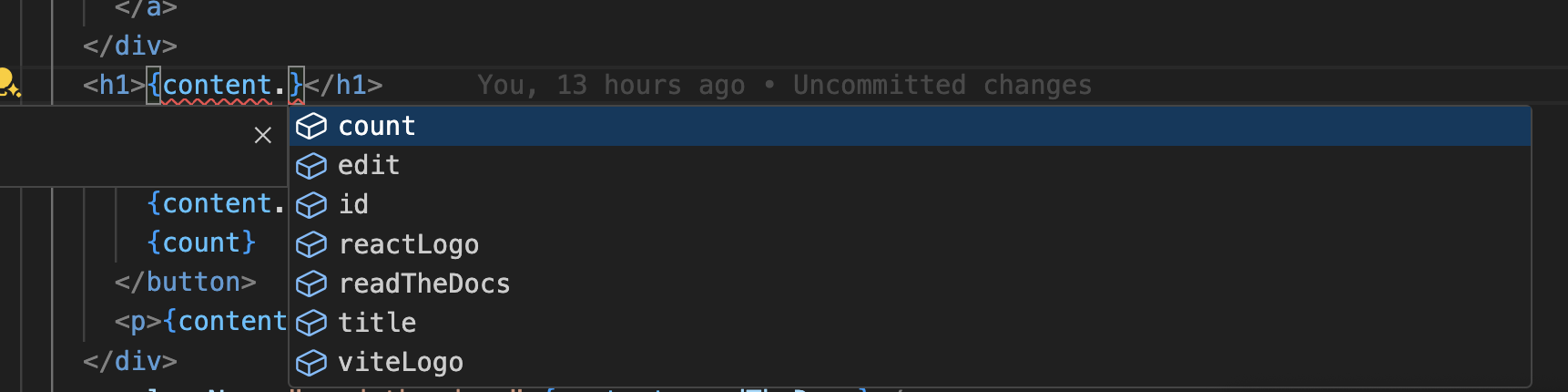
    Autocompletion

    Translation error

    Ensure your TypeScript configuration includes the autogenerated types and is set up for Preact:

    tsconfig.json
    Copy code

    Copy the code to the clipboard

    {  compilerOptions: {    // ...    jsx: "react-jsx",    jsxImportSource: "preact", // Recommended for Preact 10+  },  include: [    // ... Your existing TypeScript configurations    ".intlayer/**/*.ts", // Include the auto-generated types  ],}

    Git Configuration

    It is recommended to ignore the files generated by Intlayer. This allows you to avoid committing them to your Git repository.

    To do this, you can add the following instructions to your .gitignore file:

    bash
    Copy code

    Copy the code to the clipboard

    # Ignore the files generated by Intlayer.intlayer

    VS Code Extension

    To improve your development experience with Intlayer, you can install the official Intlayer VS Code Extension.

    Install from the VS Code Marketplace

    This extension provides:

    • Autocompletion for translation keys.
    • Real-time error detection for missing translations.
    • Inline previews of translated content.
    • Quick actions to easily create and update translations.

    For more details on how to use the extension, refer to the Intlayer VS Code Extension documentation.


    (Optional) Step 15: Extract the content of your components

    If you have an existing codebase, transforming thousands of files can be time-consuming.

    To ease this process, Intlayer propose a compiler / extractor to transform your components and extract the content.

    To set it up, you can add a compiler section in your intlayer.config.ts file:

    intlayer.config.ts
    Copy code

    Copy the code to the clipboard

    import { type IntlayerConfig } from "intlayer";
    
    const config: IntlayerConfig = {
      // ... Rest of your config
      compiler: {
        /**
         * Indicates if the compiler should be enabled.
         */
        enabled: true,
    
        /**
         * Defines the output files path
         */
        output: ({ fileName, extension }) => `./${fileName}${extension}`,
    
        /**
         * Indicates if the components should be saved after being transformed.
         *
         * - If `true`, the compiler will rewrite the component file in the disk. So the transformation will be permanent, and the compiler will skip the transformation for the next process. That way, the compiler can transform the app, and then it can be removed.
         *
         * - If `false`, the compiler will inject the `useIntlayer()` function call into the code in the build output only, and keep the base codebase intact. The transformation will be done only in memory.
         */
        saveComponents: false,
    
        /**
         * Dictionary key prefix
         */
        dictionaryKeyPrefix: "",
      },
    };
    
    export default config;

    Run the extractor to transform your components and extract the content

    bash
    Copy code

    Copy the code to the clipboard

    npx intlayer extract

    Update your vite.config.ts to include the intlayerCompiler plugin:

    vite.config.ts
    Copy code

    Copy the code to the clipboard

    import { defineConfig } from "vite";import { intlayer, intlayerCompiler } from "vite-intlayer";export default defineConfig({ plugins: [   intlayer(),   intlayerCompiler(), // Adds the compiler plugin ],});
    bash
    Copy code

    Copy the code to the clipboard

    npm run build # Or npm run dev

    Go Further

    To go further, you can implement the visual editor or externalize your content using the CMS.

    Astro and Solid
    Astro and Lit
    Alt+→

    In this page

      Discussions are anonymous and regularly reviewed to address common issues. Feel free to share feature ideas, feedback on the documentation, or anything related to Intlayer, we use this input to shape our roadmap and improve the product.

      npm install intlayer astro-intlayer preact preact-intlayer @astrojs/preactnpx intlayer init
      import { Locales, type IntlayerConfig } from "intlayer";const config: IntlayerConfig = {  internationalization: {    locales: [      Locales.ENGLISH,      Locales.FRENCH,      Locales.SPANISH,      // Your other locales    ],    defaultLocale: Locales.ENGLISH,  },};export default config;
      // @ts-checkimport { intlayer } from "astro-intlayer";import preact from "@astrojs/preact";import { defineConfig } from "astro/config";// https://astro.build/configexport default defineConfig({  integrations: [intlayer(), preact()],});
      import { t, type Dictionary } from "intlayer";import type { ComponentChildren } from "preact";const appContent = {  key: "app",  content: {    title: t({      en: "Hello World",      fr: "Bonjour le monde",      es: "Hola mundo",    }),  },} satisfies Dictionary;export default appContent;
      ---import {  getIntlayer,  getLocaleFromPath,  getLocalizedUrl,  getPrefix,  localeMap,  defaultLocale,  getHTMLTextDir,  type LocalesValues,} from "intlayer";import { PreactIsland } from "../../components/preact/PreactIsland";export const getStaticPaths = () => {  return localeMap(({ locale }) => ({    params: { locale: getPrefix(locale).localePrefix },  }));};const locale = getLocaleFromPath(Astro.url.pathname) as LocalesValues;const { title } = getIntlayer("app", locale);---<!doctype html><html lang={locale} dir={getHTMLTextDir(locale)}>  <head>    <meta charset="utf-8" />    <meta name="viewport" content="width=device-width" />    <link rel="icon" type="image/svg+xml" href="/favicon.svg" />    <title>{title}</title>    <!-- Canonical link: Tells search engines which is the primary version of this page -->    <link      rel="canonical"      href={new URL(getLocalizedUrl(Astro.url.pathname, locale), Astro.site)}    />    <!-- Hreflang: Tell Google about all localized versions -->    {      localeMap(({ locale: mapLocale }) => (        <link          rel="alternate"          hreflang={mapLocale}          href={new URL(            getLocalizedUrl(Astro.url.pathname, mapLocale),            Astro.site          )}        />      ))    }    <!-- x-default: Fallback for users in unmatched languages -->    <link      rel="alternate"      hreflang="x-default"      href={new URL(        getLocalizedUrl(Astro.url.pathname, defaultLocale),        Astro.site      )}    />  </head>  <body>    <!-- The Preact island renders all interactive content, including the locale switcher -->    <PreactIsland locale={locale} client:only="preact" />  </body></html>
      <img src="{content.image.src.value}" alt="{content.image.value}" /><img src="{content.image.src.toString()}" alt="{content.image.toString()}" /><img src="{String(content.image.src)}" alt="{String(content.image)}" />
      /** @jsxImportSource preact */import { IntlayerProvider, useIntlayer } from "preact-intlayer";import { type LocalesValues } from "intlayer";import type { FunctionalComponent } from "preact";import { LocaleSwitcher } from "./LocaleSwitcher";const App: FunctionalComponent = () => {  const { title } = useIntlayer("app");  return (    <div>      <h1>{title}</h1>      <LocaleSwitcher />    </div>  );};export const PreactIsland: FunctionalComponent<{ locale: LocalesValues }> = ({  locale,}) => (  <IntlayerProvider locale={locale}>    <App />  </IntlayerProvider>);
      /** @jsxImportSource preact */import { useLocale } from "preact-intlayer";import { getLocalizedUrl, getLocaleName, type LocalesValues } from "intlayer";import type { FunctionalComponent } from "preact";export const LocaleSwitcher: FunctionalComponent = () => {  const { locale, availableLocales, setLocale } = useLocale({    onLocaleChange: (newLocale: LocalesValues) => {      // Navigate to the localized URL on locale change      window.location.href = getLocalizedUrl(        window.location.pathname,        newLocale      );    },  });  return (    <div class="locale-switcher">      <span class="switcher-label">Switch locale:</span>      <div class="locale-buttons">        {availableLocales.map((localeItem) => (          <button            key={localeItem}            onClick={() => setLocale(localeItem)}            class={`locale-btn ${localeItem === locale ? "active" : ""}`}            disabled={localeItem === locale}          >            <span class="ls-own-name">{getLocaleName(localeItem)}</span>            <span class="ls-current-name">              {getLocaleName(localeItem, locale)}            </span>            <span class="ls-code">{localeItem.toUpperCase()}</span>          </button>        ))}      </div>    </div>  );};
      import type { APIRoute } from "astro";import { generateSitemap, type SitemapUrlEntry } from "intlayer";const pathList: SitemapUrlEntry[] = [  { path: "/", changefreq: "daily", priority: 1.0 },  { path: "/about", changefreq: "monthly", priority: 0.7 },];const SITE_URL = import.meta.env.SITE ?? "http://localhost:4321";export const GET: APIRoute = async ({ site }) => {  const xmlOutput = generateSitemap(pathList, { siteUrl: SITE_URL });  return new Response(xmlOutput, {    headers: { "Content-Type": "application/xml" },  });};
      import type { APIRoute } from "astro";import { getMultilingualUrls } from "intlayer";const getAllMultilingualUrls = (urls: string[]) =>  urls.flatMap((url) => Object.values(getMultilingualUrls(url)) as string[]);const disallowedPaths = getAllMultilingualUrls(["/admin", "/private"]);export const GET: APIRoute = ({ site }) => {  const robotsTxt = [    "User-agent: *",    "Allow: /",    ...disallowedPaths.map((path) => `Disallow: ${path}`),    "",    `Sitemap: ${new URL("/sitemap.xml", site).href}`,  ].join("\n");  return new Response(robotsTxt, {    headers: { "Content-Type": "text/plain" },  });};
      {  compilerOptions: {    // ...    jsx: "react-jsx",    jsxImportSource: "preact", // Recommended for Preact 10+  },  include: [    // ... Your existing TypeScript configurations    ".intlayer/**/*.ts", // Include the auto-generated types  ],}
      # Ignore the files generated by Intlayer.intlayer
      npx intlayer extract
      import { defineConfig } from "vite";import { intlayer, intlayerCompiler } from "vite-intlayer";export default defineConfig({ plugins: [   intlayer(),   intlayerCompiler(), // Adds the compiler plugin ],});
      npm run build # Or npm run dev