HomeSandboxShowcaseAppDocBlog
    • EnglishEnglish
      EN
    • русскийRussian
      RU
    • 日本語Japanese
      JA
    • françaisFrench
      FR
    • 한국어Korean
      KO
    • 中文Chinese
      ZH
    • españolSpanish
      ES
    • DeutschGerman
      DE
    • العربيةArabic
      AR
    • italianoItalian
      IT
    • British EnglishBritish English
      EN-GB
    • portuguêsPortuguese
      PT
    • हिन्दीHindi
      HI
    • TürkçeTurkish
      TR
    • polskiPolish
      PL
    • IndonesiaIndonesian
      ID
    • Tiếng ViệtVietnamese
      VI
    • українськаUkrainian
      UK
    /
    Alt+←
    What is Internationalization (i18n)?
    SEO and i18n
    Guide
    • i18n using next-i18next
    • i18n using next-intl
    Use Intlayer on your solution
    • Automate next-i18next
    • Automate react-i18next
    • Automate next-intl
    • Automate react-intl
    • Automate vue-i18n
    Comparisons
    • next-i18next vs next-intl vs Intlayer
    • react-i18next vs react-intl vs Intlayer
    Documentation
    1. Blog
    2. Next i18next vs next intl vs intlayer
    Creation:2025-08-23Last update:2025-09-29
    Reference this doc to your favorite AI assistant
    ChatGPT
    Claude
    DeepSeek
    Google AI mode
    Gemini
    Perplexity
    Mistral
    Grok

    Ask your question and get a summary of the document by referencing this page and the AI provider of your choice

    Edit this doc

    If you have an idea for improving this documentation, please feel free to contribute by submitting a pull request on GitHub.

    GitHub link to the documentation
    Copy

    Copy doc Markdown to clipboard

    next-i18next VS next-intl VS intlayer | Next.js Internationalization (i18n)
    next-i18next VS next-intl VS intlayer

    Let’s take a look into the similarities and differences between three i18n options for Next.js: next-i18next, next-intl, and Intlayer.

    This is not a full tutorial. It’s a comparison to help you pick.

    We focus on Next.js 13+ App Router (with React Server Components) and evaluate:

    tl;dr: All three can localize a Next.js app. If you want component-scoped content, strict TypeScript types, build-time missing-key checks, tree-shaken dictionaries, and first-class App Router + SEO helpers, Intlayer is the most complete, modern choice.
    One confusion often made by developers is to think that next-intl is the Next.js version of react-intl. It's not, next-intl is maintained by Amann, while react-intl is maintained by FormatJS.

    In short

    • next-intl - Lightweight, straightforward message formatting with solid Next.js support. Centralized catalogs are common; DX is simple, but safety and large-scale maintenance remain mostly your responsibility.
    • next-i18next - i18next in Next.js clothing. Mature ecosystem and features via plugins (e.g., ICU), but configuration can be verbose and catalogs tend to centralize as projects grow.
    • Intlayer - Component-centric content model for Next.js, strict TS typing, build-time checks, tree-shaking, built-in middleware & SEO helpers, optional Visual Editor/CMS, and AI-assisted translations.

    Show all table content

    Open the table in a modal to view all data content clearly

    Library GitHub Stars Total Commits Last Commit First Version NPM Version NPM Downloads
    aymericzip/intlayer GitHub Repo stars GitHub commit activity Last Commit April 2024 npm npm downloads
    amannn/next-intl GitHub Repo stars GitHub commit activity Last Commit Nov 2020 npm npm downloads
    i18next/i18next GitHub Repo stars GitHub commit activity Last Commit Jan 2012 npm npm downloads
    i18next/next-i18next GitHub Repo stars GitHub commit activity Last Commit Nov 2018 npm npm downloads
    Badges update automatically. Snapshots will vary over time.

    Side-by-Side Feature Comparison (Next.js focused)

    Show all table content

    Open the table in a modal to view all data content clearly

    Feature next-intlayer (Intlayer) next-intl next-i18next
    Translations Near Components ✅ Yes, content collocated with each component ❌ No ❌ No
    TypeScript Integration ✅ Advanced, auto-generated strict types ✅ Good ⚠️ Basic
    Missing Translation Detection ✅ TypeScript error hightlight and build-time error/warning ⚠️ Runtime fallback ⚠️ Runtime fallback
    Rich Content (JSX/Markdown/components) ✅ Direct support ❌ Not designed for rich nodes ⚠️ Limited
    AI-powered Translation ✅ Yes, supports multiple AI providers. Usable using your own API keys. Considers the context of your application and content scope ❌ No ❌ No
    Visual Editor ✅ Yes, local Visual Editor + optional CMS; can externalize codebase content; embeddable ❌ No / available via external localization platforms ❌ No / available via external localization platforms
    Localized Routing ✅ Yes, supports localized paths out of the box (works with Next.js & Vite) ✅ Built-in, App Router supports [locale] segment ✅ Built-in
    Dynamic Route Generation ✅ Yes ✅ Yes ✅ Yes
    Pluralization ✅ Enumeration-based patterns ✅ Good ✅ Good
    Formatting (dates, numbers, currencies) ✅ Optimized formatters (Intl under the hood) ✅ Good (Intl helpers) ✅ Good (Intl helpers)
    Content Format ✅ .tsx, .ts, .js, .json, .md, .txt, (.yaml WIP) ✅ .json, .js, .ts ⚠️ .json
    ICU support ⚠️ WIP ✅ Yes ⚠️ Via plugin (i18next-icu)
    SEO Helpers (hreflang, sitemap) ✅ Built-in tools: helpers for sitemap, robots.txt, metadata ✅ Good ✅ Good
    Ecosystem / Community ⚠️ Smaller but growing fast and reactive ✅ Good ✅ Good
    Server-side Rendering & Server Components ✅ Yes, streamlined for SSR / React Server Components ⚠️ Supported at page level but need to pass t-functions on component tree for children server components ⚠️ Supported at page level but need to pass t-functions on component tree for children server components
    Tree-shaking (load only used content) ✅ Yes, per-component at build time via Babel/SWC plugins ⚠️ Partial ⚠️ Partial
    Lazy loading ✅ Yes, per-locale / per-dictionary ✅ Yes (per-route/per-locale), need namespace management ✅ Yes (per-route/per-locale), need namespace management
    Purge unused content ✅ Yes, per-dictionary at build time ❌ No, can be managed manually with namespace management ❌ No, can be managed manually with namespace management
    Management of Large Projects ✅ Encourages modular, suited for design-system ✅ Modular with setup ✅ Modular with setup
    Testing Missing Translations (CLI/CI) ✅ CLI: npx intlayer content test (CI-friendly audit) ⚠️ Not built-in; docs suggest npx @lingual/i18n-check ⚠️ Not built-in; rely on i18next tools / runtime saveMissing

    Introduction

    Next.js gives you built-in support for internationalized routing (e.g. locale segments). But that feature doesn’t do translations on its own. You still need a library to render localized content to your users.

    Many i18n libraries exist, but in the Next.js world today, three are gaining traction: next-i18next, next-intl, and Intlayer.


    Architecture & scalability

    • next-intl / next-i18next: Default to centralized catalogs per locale (plus namespaces in i18next). Works fine early on, but often becomes a big shared surface area with rising coupling and key churn.
    • Intlayer: Encourages per-component (or per-feature) dictionaries co-located with the code they serve. This lowers cognitive load, eases duplication/migration of UI pieces, and reduces cross-team conflicts. Unused content is naturally easier to spot and purge.

    Why it matters: In large codebases or design-system setups, modular content scales better than monolithic catalogs.


    Bundle sizes & dependencies

    After building the application, the bundle is the JavaScript that the browser will load to render the page. Bundle size is therefore important for application performance.

    Two components are important in the context of a multi-language application bundle:

    • The application code
    • The content loaded by the browser

    Application Code

    The importance of application code is minimal in this case. All three solutions are tree-shakable, meaning that unused parts of the code are not included in the bundle.

    Here's a comparison of the JavaScript bundle size loaded by the browser for a multi-language application with the three solutions.

    If we don't need any formatter in the application, the list of exported functions after tree-shaking will be:

    • next-intlayer: useIntlayer, useLocale, NextIntlClientProvider, (Bundle size is 180.6 kB -> 15.24 kB (gzip))
    • next-intl: useTranslations, useLocale, NextIntlClientProvider, (Bundle size is 101.3 kB -> 31.4 kB (gzip))
    • next-i18next: useTranslation, useI18n, I18nextProvider, (Bundle size is 80.7 kB -> 25.5 kB (gzip))

    These functions are only wrappers around React context/state, so the total impact of the i18n library on bundle size is minimal.

    Content and Translations

    This part is often ignored by developers, but let's consider the case of an application composed of 10 pages in 10 languages. Let's assume that each page integrates 100% unique content to simplify the calculation (in reality, much content is redundant between pages, e.g., page title, header, footer, etc.).

    A user wanting to visit the /fr/about page will load the content of one page in a given language. Ignoring content optimization would mean loading 8,200% ((1 + (((10 pages - 1) × (10 languages - 1)))) × 100) of the application content unnecessarily. Do you see the problem? Even if this content remains text, and while you probably prefer to think about optimizing your site's images, you're sending useless content across the globe and making users' computers process it for nothing.

    Two important issues:

    • Splitting by route:

      If I'm on the /about page, I don't want to load the content of the /home page
    • Splitting by locale:

      If I'm on the /fr/about page, I don't want to load the content of the /en/about page

    Again, all three solutions are aware of these issues and allow managing these optimizations. The difference between the three solutions is the DX (Developer Experience).

    next-intl and next-i18next use a centralized approach to manage translations, allowing splitting JSON by locale and by sub-files. In next-i18next, we call the JSON files 'namespaces'; next-intl allows declaring messages. In intlayer, we call the JSON files 'dictionaries'.

    • In the case of next-intl, like next-i18next, content is loaded at the page/layout level, then this content is loaded into a context provider. This means the developer must manually manage the JSON files that will be loaded for each page.
    In practice, this implies that developers often skip this optimization, preferring to load all content in the page's context provider for simplicity.
    • In the case of intlayer, all content is loaded in the application. Then a plugin (@intlayer/babel / @intlayer/swc) takes care of optimizing the bundle by loading only the content used on the page. The developer therefore doesn't need to manually manage the dictionaries that will be loaded. This allows better optimization, better maintainability, and reduces development time.

    As the application grows (especially when multiple developers work on the application), it's common to forget to remove content that's no longer used from JSON files.

    Note that all JSON is loaded in all cases (next-intl, next-i18next, intlayer).

    This is why Intlayer's approach is more performant: if a component is no longer used, its dictionary is not loaded in the bundle.

    How the library handles fallbacks is also important. Let's consider that the application is in English by default, and the user visits the /fr/about page. If translations are missing in French, we'll consider the English fallback.

    In the case of next-intl and next-i18next, the library requires loading the JSON related to the current locale, but also to the fallback locale. Thus, considering that all content has been translated, each page will load 100% unnecessary content. In comparison, intlayer processes the fallback at dictionary build time. Thus, each page will load only the content used.

    Note: To optimize the bundle using intlayer, you need to set the importMode: 'dynamic' option in your intlayer.config.ts file. And ensure the plugin @intlayer/babel / @intlayer/swc is installed (installed by default using vite-intlayer).

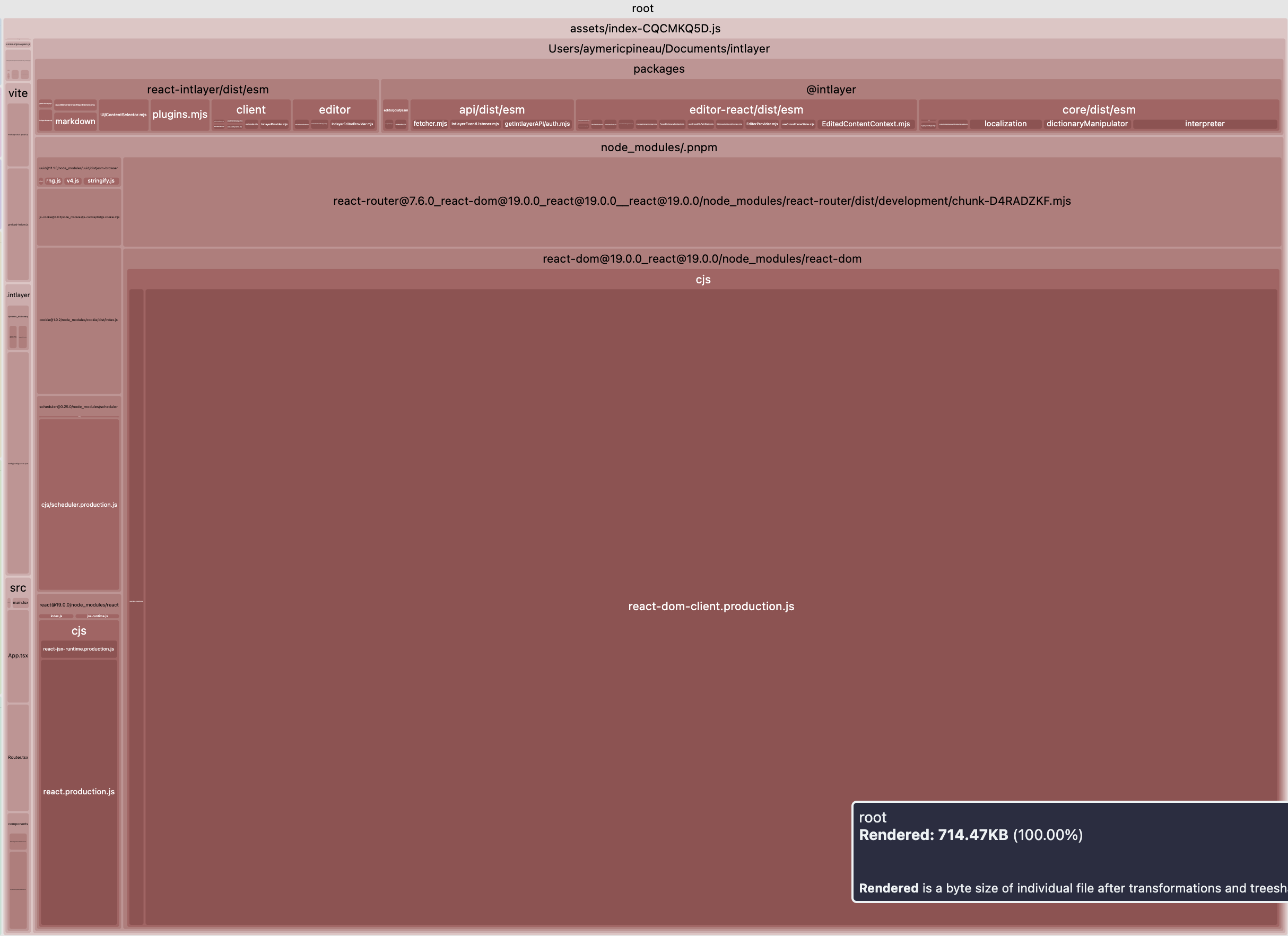
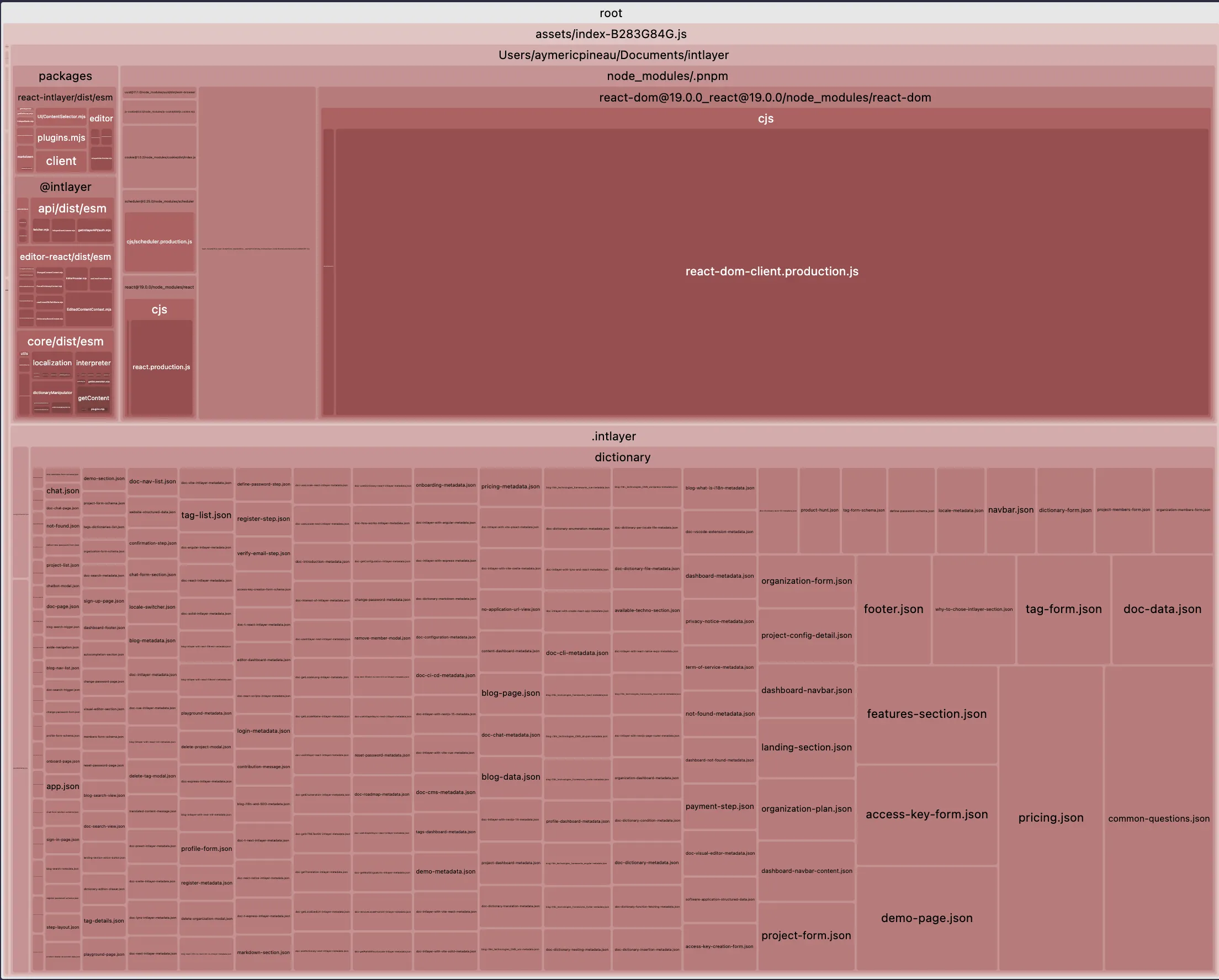
    Here an example of the impact of bundle size optimization using intlayer in a vite + react application:

    Show all table content

    Open the table in a modal to view all data content clearly

    Optimized bundle Bundle not optimized
    optimized bundle no optimized bundle

    TypeScript & safety

    next-i18next

    • Base typings for hooks. strict key typing requires extra tooling/config.

    next-intl

    • Solid TypeScript support, but keys aren’t strictly typed by default. you’ll maintain safety patterns manually.

    intlayer

    • Generates strict types from your content. IDE autocompletion and compile-time errors catch typos and missing keys before deploy.

    Why it matters: Strong typing shifts failures left (CI/build) instead of right (runtime).


    Missing translation handling

    next-i18next

    • Relies on runtime fallbacks. Build doesn’t fail.

    next-intl

    • Relies on runtime fallbacks. Build doesn’t fail.

    intlayer

    • Build-time detection with warnings/errors for missing locales or keys.

    Why it matters: Catching gaps during build prevents 'undefined' strings in production.


    Routing, middleware & URL strategy

    next-i18next

    • Allows localized routing. But middleware is not built-in.

    next-intl

    • Allows localized routing.
    • Provides middleware.

    intlayer

    • Allows localized routing.
    • Provides middleware.

    Why it matters: Helps for SEO and discovery, as well as user experience.


    Server Components (RSC) alignment

    next-i18next

    • Support page and layout server components.
    • Do not provide synchronous API for children server components.

    next-intl

    • Support page and layout server components.
    • Do not provide synchronous API for children server components.

    intlayer

    • Support page and layout server components.
    • Provide synchronous API for children server components.

    Why it matters: Server component suport is a key feature of Next.js 13+, helping for performance. Passing props the locale or the t function from the parent to the child server components make your components less reusable.


    Integration with localization platforms (TMS)

    Large organizations often rely on Translation Management Systems (TMS) like Crowdin, Phrase, Lokalise, Localizely, or Localazy.

    • Why companies care

      • Collaboration & roles: Multiple actors are involved: developers, product managers, translators, reviewers, marketing teams.
      • Scale & efficiency: continuous localization, in‑context review.
    • next-intl / next-i18next

      • Typically use centralized JSON catalogs, so export/import with TMS is straightforward.
      • Mature ecosystems and examples/integrations for the platforms above.
    • Intlayer

      • Encourages decentralized, per-component dictionaries and supports TypeScript/TSX/JS/JSON/MD content.
      • This improves modularity in code, but can make plug‑and‑play TMS integration harder when a tool expects centralized, flat JSON files.
      • Intlayer provides alternatives: AI‑assisted translations (using your own provider keys), a Visual Editor/CMS, and CLI/CI workflows to catch and prefill gaps.
    Note: next-intl and i18next also accepts TypeScript catalogs. If your team stores messages in .ts files or decentralizes them by feature, you can face similar TMS friction. However, many next-intl setups remain centralized in a locales/ folder, which is a bit easier to refactor to JSON for TMS.

    Developer Experience

    This part makes a deep comparison between the three solutions. Rather than considering simple cases, as described in the 'getting started' documentation for each solution, we will consider a real use case, more similar to a real project.

    App structure

    The app structure is important to ensure good maintainability for your codebase.

    bash
    Copy code

    Copy the code to the clipboard

    .├── i18n.config.ts└── src  ├── locales  │   ├── en  │   │  ├── common.json  │   │  └── about.json  │   └── fr  │      ├── common.json  │      └── about.json  ├── app  │   ├── i18n  │   │   └── server.ts  │   └── [locale]  │       ├── layout.tsx  │       └── about.tsx  └── components      ├── I18nProvider.tsx      ├── ClientComponent.tsx      └── ServerComponent.tsx
    bash
    Copy code

    Copy the code to the clipboard

    .├── i18n.ts├── locales│   ├── en│   │  ├── home.json│   │  └── navbar.json│   ├── fr│   │  ├── home.json│   │  └── navbar.json│   └── es│      ├── home.json│      └── navbar.json└── src  ├── middleware.ts  ├── app  │   ├── i18n  │   │   └── server.ts  │   └── [locale]  │       └── home.tsx  └── components      └── Navbar          └── index.tsx
    bash
    Copy code

    Copy the code to the clipboard

    .├── intlayer.config.ts└── src  ├── middleware.ts  ├── app  │   └── [locale]  │       ├── layout.tsx  │       └── home  │           ├── index.tsx  │           └── index.content.ts  └── components      └── Navbar          ├── index.tsx          └── index.content.ts

    Comparison

    • next-intl / next-i18next: Centralized catalogs (JSON; namespaces/messages). Clear structure, integrates well with translation platforms, but can lead to more cross-file edits as apps grow.
    • Intlayer: Per-component .content.{ts|js|json} dictionaries co-located with components. Easier component reuse and local reasoning; adds files and relies on build-time tooling.

    Setup and Loading Content

    As mentioned previously, you must optimize how each JSON file is imported into your code. How the library handles content loading is important.

    i18n.config.ts
    Copy code

    Copy the code to the clipboard

    export const locales = ["en", "fr"] as const;export type Locale = (typeof locales)[number];export const defaultLocale: Locale = "en";export const rtlLocales = ["ar", "he", "fa", "ur"] as const;export const isRtl = (locale: string) =>(rtlLocales as readonly string[]).includes(locale);export function localizedPath(locale: string, path: string) {return locale === defaultLocale ? path : "/" + locale + path;}const ORIGIN = "https://example.com";export function abs(locale: string, path: string) {return ORIGIN + localizedPath(locale, path);}
    src/app/i18n/server.ts
    Copy code

    Copy the code to the clipboard

    import { createInstance } from "i18next";import { initReactI18next } from "react-i18next/initReactI18next";import resourcesToBackend from "i18next-resources-to-backend";import { defaultLocale } from "@/i18n.config";// Load JSON resources from src/locales/<locale>/<namespace>.jsonconst backend = resourcesToBackend((locale: string, namespace: string) =>  import(`../../locales/${locale}/${namespace}.json`));export async function initI18next(locale: string,namespaces: string[] = ["common"]) {const i18n = createInstance();await i18n  .use(initReactI18next)  .use(backend)  .init({    lng: locale,    fallbackLng: defaultLocale,    ns: namespaces,    defaultNS: "common",    interpolation: { escapeValue: false },    react: { useSuspense: false },  });return i18n;}
    src/components/I18nProvider.tsx
    Copy code

    Copy the code to the clipboard

    "use client";import * as React from "react";import { I18nextProvider } from "react-i18next";import { createInstance } from "i18next";import { initReactI18next } from "react-i18next/initReactI18next";import resourcesToBackend from "i18next-resources-to-backend";import { defaultLocale } from "@/i18n.config";const backend = resourcesToBackend((locale: string, namespace: string) =>  import(`../../locales/${locale}/${namespace}.json`));type Props = {locale: string;namespaces?: string[];resources?: Record<string, any>; // { ns: bundle }children: React.ReactNode;};export default function I18nProvider({locale,namespaces = ["common"],resources,children,}: Props) {const [i18n] = React.useState(() => {  const i = createInstance();  i.use(initReactI18next)    .use(backend)    .init({      lng: locale,      fallbackLng: defaultLocale,      ns: namespaces,      resources: resources ? { [locale]: resources } : undefined,      defaultNS: "common",      interpolation: { escapeValue: false },      react: { useSuspense: false },    });  return i;});return <I18nextProvider i18n={i18n}>{children}</I18nextProvider>;}
    src/app/[locale]/layout.tsx
    Copy code

    Copy the code to the clipboard

    import type { ReactNode } from "react";import { locales, defaultLocale, isRtl, type Locale } from "@/i18n.config";export const dynamicParams = false;export function generateStaticParams() {return locales.map((locale) => ({ locale }));}export default function LocaleLayout({children,params,}: {children: ReactNode;params: { locale: string };}) {const locale: Locale = (locales as readonly string[]).includes(params.locale)  ? params.locale  : defaultLocale;const dir = isRtl(locale) ? "rtl" : "ltr";return (  <html lang={locale} dir={dir}>    <body>{children}</body>  </html>);}
    src/app/[locale]/about.tsx
    Copy code

    Copy the code to the clipboard

    import I18nProvider from "@/components/I18nProvider";import { initI18next } from "@/app/i18n/server";import type { Locale } from "@/i18n.config";import ClientComponent from "@/components/ClientComponent";import ServerComponent from "@/components/ServerComponent";// Force static rendering for the pageexport const dynamic = "force-static";export default async function AboutPage({params: { locale },}: {params: { locale: Locale };}) {const namespaces = ["common", "about"] as const;const i18n = await initI18next(locale, [...namespaces]);const tAbout = i18n.getFixedT(locale, "about");return (  <I18nProvider locale={locale} namespaces={[...namespaces]}>    <main>      <h1>{tAbout("title")}</h1>      <ClientComponent />      <ServerComponent t={tAbout} locale={locale} count={0} />    </main>  </I18nProvider>);}
    src/i18n.ts
    Copy code

    Copy the code to the clipboard

    import { getRequestConfig } from "next-intl/server";import { notFound } from "next/navigation";export const locales = ["en", "fr", "es"] as const;export const defaultLocale = "en" as const;async function loadMessages(locale: string) {// Load only the namespaces your layout/pages needconst [common, about] = await Promise.all([  import(`../locales/${locale}/common.json`).then((m) => m.default),  import(`../locales/${locale}/about.json`).then((m) => m.default),]);return { common, about } as const;}export default getRequestConfig(async ({ locale }) => {if (!locales.includes(locale)) notFound();return {  messages: await loadMessages(locale),};});
    src/app/[locale]/layout.tsx
    Copy code

    Copy the code to the clipboard

    import type { ReactNode } from "react";import { locales } from "@/i18n";import {getLocaleDirection,unstable_setRequestLocale,} from "next-intl/server";export const dynamic = "force-static";export function generateStaticParams() {return locales.map((locale) => ({ locale }));}export default async function LocaleLayout({children,params,}: {children: ReactNode;params: Promise<{ locale: string }>;}) {const { locale } = await params;// Set the active request locale for this server render (RSC)unstable_setRequestLocale(locale);const dir = getLocaleDirection(locale);return (  <html lang={locale} dir={dir}>    <body>{children}</body>  </html>);}
    src/app/[locale]/about/page.tsx
    Copy code

    Copy the code to the clipboard

    import { getTranslations, getMessages, getFormatter } from "next-intl/server";import { NextIntlClientProvider } from "next-intl";import pick from "lodash/pick";import ServerComponent from "@/components/ServerComponent";import ClientComponentExample from "@/components/ClientComponentExample";export const dynamic = "force-static";export default async function AboutPage({params,}: {params: Promise<{ locale: string }>;}) {const { locale } = await params;// Messages are loaded server-side. Push only what's needed to the client.const messages = await getMessages();const clientMessages = pick(messages, ["common", "about"]);// Strictly server-side translations/formattingconst tAbout = await getTranslations("about");const tCounter = await getTranslations("about.counter");const format = await getFormatter();const initialFormattedCount = format.number(0);return (  <NextIntlClientProvider locale={locale} messages={clientMessages}>    <main>      <h1>{tAbout("title")}</h1>      <ClientComponentExample />      <ServerComponent        formattedCount={initialFormattedCount}        label={tCounter("label")}        increment={tCounter("increment")}      />    </main>  </NextIntlClientProvider>);}
    intlayer.config.ts
    Copy code

    Copy the code to the clipboard

    import { type IntlayerConfig, Locales } from "intlayer";const config: IntlayerConfig = {internationalization: {  locales: [Locales.ENGLISH, Locales.FRENCH, Locales.SPANISH],  defaultLocale: Locales.ENGLISH,},};export default config;
    src/app/[locale]/layout.tsx
    Copy code

    Copy the code to the clipboard

    import { getHTMLTextDir } from "intlayer";import {IntlayerClientProvider,generateStaticParams,type NextLayoutIntlayer,} from "next-intlayer";export const dynamic = "force-static";const LocaleLayout: NextLayoutIntlayer = async ({ children, params }) => {const { locale } = await params;return (  <html lang={locale} dir={getHTMLTextDir(locale)}>    <body>      <IntlayerClientProvider locale={locale}>        {children}      </IntlayerClientProvider>    </body>  </html>);};export default LandingLayout;
    src/app/[locale]/about/page.tsx
    Copy code

    Copy the code to the clipboard

    import { PageContent } from "@components/PageContent";import type { NextPageIntlayer } from "next-intlayer";import { IntlayerServerProvider, useIntlayer } from "next-intlayer/server";import { ClientComponent, ServerComponent } from "@components";const LandingPage: NextPageIntlayer = async ({ params }) => {const { locale } = await params;const { title } = useIntlayer("about", locale);return (  <IntlayerServerProvider locale={locale}>    <main>      <h1>{title}</h1>      <ClientComponent />      <ServerComponent />    </main>  </IntlayerServerProvider>);};export default LandingPage;

    Comparison

    All three support per-locale content loading and providers.

    • With next-intl/next-i18next, you typically load selected messages/namespaces per route and place providers where needed.

    • With Intlayer, adds build-time analysis to infer usage, which can reduce manual wiring and may allow a single root provider.

    Choose between explicit control and automation based on team preference.

    Usage in a client component

    Let's take an example of a client component rendering a counter.

    Translations (one JSON per namespace under src/locales/...)

    src/locales/en/about.json
    Copy code

    Copy the code to the clipboard

    {"title": "About","description": "About page description","counter": {  "label": "Counter",  "increment": "Increment"}}
    src/locales/fr/about.json
    Copy code

    Copy the code to the clipboard

    {"title": "À propos","description": "Description de la page À propos","counter": {  "label": "Compteur",  "increment": "Incrémenter"}}

    Client component (loads only the required namespace)

    src/components/ClientComponent.tsx
    Copy code

    Copy the code to the clipboard

    "use client";import React, { useState } from "react";import { useTranslation } from "react-i18next";const ClientComponent = () => {const { t, i18n } = useTranslation("about");const [count, setCount] = useState(0);const numberFormat = new Intl.NumberFormat(i18n.language);return (  <div>    <p>{numberFormat.format(count)}</p>    <button      aria-label={t("counter.label")}      onClick={() => setCount((c) => c + 1)}    >      {t("counter.increment")}    </button>  </div>);};export default ClientComponent;

    Ensure the page/provider includes only the namespaces you need (e.g. about). If you use React < 19, memoize heavy formatters like Intl.NumberFormat.

    Translations (shape reused; load them into next-intl messages as you prefer)

    locales/en/about.json
    Copy code

    Copy the code to the clipboard

    {"counter": {  "label": "Counter",  "increment": "Increment"}}
    locales/fr/about.json
    Copy code

    Copy the code to the clipboard

    {"counter": {  "label": "Compteur",  "increment": "Incrémenter"}}

    Client component

    src/components/ClientComponentExample.tsx
    Copy code

    Copy the code to the clipboard

    "use client";import React, { useState } from "react";import { useTranslations, useFormatter } from "next-intl";const ClientComponentExample = () => {// Scope directly to the nested objectconst t = useTranslations("about.counter");const format = useFormatter();const [count, setCount] = useState(0);return (  <div>    <p>{format.number(count)}</p>    <button      aria-label={t("label")}      onClick={() => setCount((count) => count + 1)}    >      {t("increment")}    </button>  </div>);};
    Don't forget to add "about" message on the page client message

    Content

    src/components/ClientComponentExample/index.content.ts
    Copy code

    Copy the code to the clipboard

    import { t, type Dictionary } from "intlayer";const counterContent = {key: "counter",content: {  label: t({ en: "Counter", fr: "Compteur" }),  increment: t({ en: "Increment", fr: "Incrémenter" }),},} satisfies Dictionary;export default counterContent;

    Client component

    src/components/ClientComponentExample/index.tsx
    Copy code

    Copy the code to the clipboard

    "use client";import React, { useState } from "react";import { useNumber, useIntlayer } from "next-intlayer";const ClientComponentExample = () => {const [count, setCount] = useState(0);const { label, increment } = useIntlayer("counter"); // returns stringsconst { number } = useNumber();return (  <div>    <p>{number(count)}</p>    <button aria-label={label} onClick={() => setCount((count) => count + 1)}>      {increment}    </button>  </div>);};

    Comparison

    • Number formatting

      • next-i18next: no useNumber; use Intl.NumberFormat (or i18next-icu).
      • next-intl: useFormatter().number(value).
      • Intlayer: useNumber() built-in.
    • Keys

      • Keep a nested structure (about.counter.label) and scope your hook accordingly (useTranslation("about") + t("counter.label") or useTranslations("about.counter") + t("label")).
    • File locations

      • next-i18next expects JSON in public/locales/{lng}/{ns}.json.
      • next-intl is flexible; load messages however you configure.
      • Intlayer stores content in TS/JS dictionaries and resolves by key.

    Usage in a server component

    We will take the case of a UI component. This component is a server component, and should be able to be inserted as a child of a client component. (page (server component) -> client component -> server component). As this component can be inserted as a child of a client component, it cannot be async.

    src/components/ServerComponent.tsx
    Copy code

    Copy the code to the clipboard

    type ServerComponentProps = {t: (key: string) => string;locale: string;count: number;};const ServerComponent = ({ t, locale, count }: ServerComponentProps) => {const formatted = new Intl.NumberFormat(locale).format(count);return (  <div>    <p>{formatted}</p>    <button aria-label={t("counter.label")}>{t("counter.increment")}</button>  </div>);};export default ServerComponent;
    src/components/ServerComponent.tsx
    Copy code

    Copy the code to the clipboard

    type ServerComponentProps = {t: (key: string) => string;locale: string;count: number;formatter: Intl.NumberFormat;};const ServerComponent = ({t,locale,count,formatter,}: ServerComponentProps) => {const formatted = formatter.format(count);return (  <div>    <p>{formatted}</p>    <button aria-label={t("counter.label")}>{t("counter.increment")}</button>  </div>);};export default ServerComponent;

    As the server component cannot be async, you need to pass the translations and formatter function as props.

    In your page / layout:

    • import { getTranslations, getFormatter } from "next-intl/server";
    • const t = await getTranslations("about.counter");
    • const formatter = await getFormatter().then((formatter) => formatter.number());
    src/components/ServerComponent.tsx
    Copy code

    Copy the code to the clipboard

    import { useIntlayer, useNumber } from "next-intlayer/server";type ServerComponentProps = {count: number;};const ServerComponent = ({ count }: ServerComponentProps) => {const { label, increment } = useIntlayer("counter");const { number } = useNumber();return (  <div>    <p>{number(count)}</p>    <button aria-label={label}>{increment}</button>  </div>);};
    Intlayer exposes server-safe hooks via next-intlayer/server. To work, useIntlayer and useNumber use hooks-like syntax, similar to the client hooks, but depend under the hood on the server context (IntlayerServerProvider).

    Metadata / Sitemap / Robots

    Translating content is great. But people usually forget that the main goal of internationalization is to make your website more visible to the world. I18n is an incredible lever to improve your website visibility.

    Here's a list of good practices regarding multilingual SEO.

    • set hreflang meta tags in the <head> tag > It helps search engines to understand what languages are available on the page
    • list all pages translations in the sitemap.xml using http://www.w3.org/1999/xhtml XML schema >
    • do not forget to exclude prefixed pages from the robots.txt (e.g. /dashboard, and /fr/dashboard, /es/dashboard) >
    • use custom Link component to redirect to the most localized page (e.g. in french <a href="/fr/about">A propos</a> ) >

    Developers often forget to properly reference their pages across locales.

    i18n.config.ts
    Copy code

    Copy the code to the clipboard

    export const locales = ["en", "fr"] as const;export type Locale = (typeof locales)[number];export const defaultLocale: Locale = "en";export function localizedPath(locale: string, path: string) { return locale === defaultLocale ? path : "/" + locale + path;}const ORIGIN = "https://example.com";export function abs(locale: string, path: string) { return ORIGIN + localizedPath(locale, path);}
    src/app/[locale]/about/layout.tsx
    Copy code

    Copy the code to the clipboard

    import type { Metadata } from "next";import { locales, defaultLocale, localizedPath } from "@/i18n.config";type GenerateMetadataParams = { params: Promise<{   locale: string; }>;};export const generateMetadata = async ({ params,}: GenerateMetadataParams): Promise<Metadata> => { const { locale } = await params; // Import the correct JSON bundle from src/locales const messages = (await import("@/locales/" + locale + "/about.json"))   .default; const languages = Object.fromEntries(   locales.map((locale) => [locale, localizedPath(locale, "/about")]) ); return {   title: messages.title,   description: messages.description,   alternates: {     canonical: localizedPath(locale, "/about"),     languages: { ...languages, "x-default": "/about" },   }, };};export default async function AboutPage() { return <h1>About</h1>;}
    src/app/sitemap.ts
    Copy code

    Copy the code to the clipboard

    import type { MetadataRoute } from "next";import { locales, defaultLocale, abs } from "@/i18n.config";export const sitemap = (): MetadataRoute.Sitemap => { const languages = Object.fromEntries(   locales.map((locale) => [locale, abs(locale, "/about")]) ); return [   {     url: abs(defaultLocale, "/about"),     lastModified: new Date(),     changeFrequency: "monthly",     priority: 0.7,     alternates: { languages },   }, ];};
    src/app/robots.ts
    Copy code

    Copy the code to the clipboard

    import type { MetadataRoute } from "next";import { locales, defaultLocale, localizedPath } from "@/i18n.config";const ORIGIN = "https://example.com";const expandAllLocales = (path: string) => [ localizedPath(defaultLocale, path), ...locales   .filter((locale) => locale !== defaultLocale)   .map((locale) => localizedPath(locale, path)),];export const robots = (): MetadataRoute.Robots => { const disallow = [   ...expandAllLocales("/dashboard"),   ...expandAllLocales("/admin"), ]; return {   rules: { userAgent: "*", allow: ["/"], disallow },   host: ORIGIN,   sitemap: ORIGIN + "/sitemap.xml", };};
    src/app/[locale]/about/layout.tsx
    Copy code

    Copy the code to the clipboard

    import type { Metadata } from "next";import { locales, defaultLocale } from "@/i18n";import { getTranslations } from "next-intl/server";const localizedPath = (locale: string, path: string) => { return locale === defaultLocale ? path : "/" + locale + path;};type GenerateMetadataParams = { params: Promise<{   locale: string; }>;};export const generateMetadata = async ({ params,}: GenerateMetadataParams): Promise<Metadata> => { const { locale } = await params; const t = await getTranslations({ locale, namespace: "about" }); const url = "/about"; const languages = Object.fromEntries(   locales.map((locale) => [locale, localizedPath(locale, url)]) ); return {   title: t("title"),   description: t("description"),   alternates: {     canonical: localizedPath(locale, url),     languages: { ...languages, "x-default": url },   }, };};// ... Rest of the page code
    src/app/sitemap.ts
    Copy code

    Copy the code to the clipboard

    import type { MetadataRoute } from "next";import { locales, defaultLocale } from "@/i18n";const origin = "https://example.com";const formatterLocalizedPath = (locale: string, path: string) => locale === defaultLocale ? origin + path : origin + "/" + locale + path;export const sitemap = (): MetadataRoute.Sitemap => { const aboutLanguages = Object.fromEntries(   locales.map((l) => [l, formatterLocalizedPath(l, "/about")]) ); return [   {     url: formatterLocalizedPath(defaultLocale, "/about"),     lastModified: new Date(),     changeFrequency: "monthly",     priority: 0.7,     alternates: { languages: aboutLanguages },   }, ];};
    src/app/robots.ts
    Copy code

    Copy the code to the clipboard

    import type { MetadataRoute } from "next";import { locales, defaultLocale } from "@/i18n";const origin = "https://example.com";const withAllLocales = (path: string) => [ path, ...locales   .filter((locale) => locale !== defaultLocale)   .map((locale) => "/" + locale + path),];export const robots = (): MetadataRoute.Robots => { const disallow = [   ...withAllLocales("/dashboard"),   ...withAllLocales("/admin"), ]; return {   rules: { userAgent: "*", allow: ["/"], disallow },   host: origin,   sitemap: origin + "/sitemap.xml", };};
    src/app/[locale]/about/layout.tsx
    Copy code

    Copy the code to the clipboard

    import { getIntlayer, getMultilingualUrls } from "intlayer";import type { Metadata } from "next";import type { LocalPromiseParams } from "next-intlayer";export const generateMetadata = async ({ params,}: LocalPromiseParams): Promise<Metadata> => { const { locale } = await params; const metadata = getIntlayer("page-metadata", locale); const multilingualUrls = getMultilingualUrls("/about"); return {   ...metadata,   alternates: {     canonical: multilingualUrls[locale as keyof typeof multilingualUrls],     languages: { ...multilingualUrls, "x-default": "/about" },   }, };};// ... Rest of the page code
    src/app/sitemap.ts
    Copy code

    Copy the code to the clipboard

    import { getMultilingualUrls } from "intlayer";import type { MetadataRoute } from "next";const sitemap = (): MetadataRoute.Sitemap => [ {   url: "https://example.com/about",   alternates: {     languages: { ...getMultilingualUrls("https://example.com/about") },   }, },];
    src/app/robots.ts
    Copy code

    Copy the code to the clipboard

    import { getMultilingualUrls } from "intlayer";import type { MetadataRoute } from "next";const getAllMultilingualUrls = (urls: string[]) => urls.flatMap((url) => Object.values(getMultilingualUrls(url)) as string[]);const robots = (): MetadataRoute.Robots => ({ rules: {   userAgent: "*",   allow: ["/"],   disallow: getAllMultilingualUrls(["/dashboard"]), }, host: "https://example.com", sitemap: "https://example.com/sitemap.xml",});export default robots;
    Intlayer provides a getMultilingualUrls function to generate multilingual URLs for your sitemap.

    Middleware for locale routing

    Add a middleware to handle locale detection and routing:

    src/middleware.ts
    Copy code

    Copy the code to the clipboard

    import { NextResponse, type NextRequest } from "next/server";import { defaultLocale, locales } from "@/i18n.config";const PUBLIC_FILE = /\.[^/]+$/; // exclude files with extensionsexport function middleware(request: NextRequest) {const { pathname } = request.nextUrl;if (  pathname.startsWith("/_next") ||  pathname.startsWith("/api") ||  pathname.startsWith("/static") ||  PUBLIC_FILE.test(pathname)) {  return;}const hasLocale = locales.some(  (l) => pathname === "/" + l || pathname.startsWith("/" + l + "/"));if (!hasLocale) {  const locale = defaultLocale;  const url = request.nextUrl.clone();  url.pathname = "/" + locale + (pathname === "/" ? "" : pathname);  return NextResponse.redirect(url);}}export const config = {matcher: [  // Match all paths except the ones starting with these and files with an extension  "/((?!api|_next|static|.*\\..*).*)",],};

    Add a middleware to handle locale detection and routing:

    src/middleware.ts
    Copy code

    Copy the code to the clipboard

    import createMiddleware from "next-intl/middleware";import { locales, defaultLocale } from "@/i18n";export default createMiddleware({locales: [...locales],defaultLocale,localeDetection: true,});export const config = {// Skip API, Next internals and static assetsmatcher: ["/((?!api|_next|.*\\..*).*)"],};

    Intlayer provides built-in middleware handling through the next-intlayer package configuration.

    src/middleware.ts
    Copy code

    Copy the code to the clipboard

    import { intlayerProxy } from "next-intlayer/proxy";export const middleware = intlayerProxy();// applies this middleware only to files in the app directoryexport const config = {matcher: "/((?!api|_next|static|.*\\..*).*)",};

    The set up of the middleware centralized in the intlayer.config.ts file.

    Setup checklist and good practices

    • Ensure lang and dir are set on the root <html> in src/app/[locale]/layout.tsx.
    • Split translations into namespaces (for example common.json, about.json) under src/locales/<locale>/.
    • Only load required namespaces in client components using useTranslation('<ns>') and by scoping I18nProvider with the same namespaces.
    • Keep pages static when possible: export export const dynamic = 'force-static' on pages; set dynamicParams = false and implement generateStaticParams.
    • Use sync server components nested under client boundaries by passing already-computed strings or the t function and the locale.
    • For SEO, set alternates.languages in metadata, list localized URLs in sitemap.ts, and disallow duplicate localized routes in robots.ts.
    • Prefer locale-aware formatters (e.g., Intl.NumberFormat(locale)) and memoize them on the client if using React < 19.
    • Set html lang and dir: In src/app/[locale]/layout.tsx, compute dir via getLocaleDirection(locale) and set <html lang={locale} dir={dir}>.
    • Split messages by namespace: Organize JSON per locale and namespace (e.g., common.json, about.json).
    • Minimize client payload: On pages, send only required namespaces to NextIntlClientProvider (e.g., pick(messages, ['common', 'about'])).
    • Prefer static pages: Export export const dynamic = 'force-static' and generate static params for all locales.
    • Synchronous server components: Keep server components sync by passing precomputed strings (translated labels, formatted numbers) rather than async calls or non-serializable functions.
    • Modular content: Co-locate content dictionaries with components using .content.{ts|js|json} files.
    • Type safety: Leverage TypeScript integration for compile-time content validation.
    • Build-time optimization: Use Intlayer's build tools for automatic tree-shaking and bundle optimization.
    • Integrated tooling: Take advantage of built-in routing, SEO helpers, and visual editor support.

    And the winner is…

    It’s not simple. Each option has trade-offs. Here’s how I see it:

    next-i18next

    • mature, full of features, lots of community plugins, but higher setup cost. If you need i18next’s plugin ecosystem (e.g., advanced ICU rules via plugins) and your team already knows i18next, accepting more configuration for flexibility.

    next-intl

    • simplest, lightweight, fewer decisions forced on you. If you want a minimal solution, you’re comfortable with centralized catalogs, and your app is small to mid-size.

    Intlayer

    • built for modern Next.js, with modular content, type safety, tooling, and less boilerplate. If you value component-scoped content, strict TypeScript, build-time guarantees, tree-shaking, and batteries-included routing/SEO/editor tooling - especially for Next.js App Router, design-systems and large, modular codebases.

    If you prefer minimal setup and accept some manual wiring, next-intl is a good pick. If you need all the features and don't mind complexity, next-i18next works. But if you want a modern, scalable, modular solution with built tools, Intlayer aims to give you that out of the box.

    Alternative for enterprise teams: If you need a well-proven solution that works perfectly with established localization platforms like Crowdin, Phrase, or other professional translation management systems, consider next-intl or next-i18next for their mature ecosystem and proven integrations.
    Future roadmap: Intlayer also plans to develop plugins that work on top of i18next and next-intl solutions. This will give you the advantages of Intlayer for automation, syntax, and content management while keeping the security and stability provided by these established solutions in your application code.

    GitHub STARs

    GitHub stars are a strong indicator of a project's popularity, community trust, and long-term relevance. While not a direct measure of technical quality, they reflect how many developers find the project useful, follow its progress, and are likely to adopt it. For estimating the value of a project, stars help compare traction across alternatives and provide insights into ecosystem growth.

    Star History Chart


    Conclusion

    All three libraries succeed at core localization. The difference is how much work you must do to achieve a robust, scalable setup in modern Next.js:

    • With Intlayer, modular content, strict TS, build-time safety, tree-shaken bundles, and first-class App Router + SEO tooling are defaults, not chores.
    • If your team prizes maintainability and speed in a multi-locale, component-driven app, Intlayer offers the most complete experience today.

    Refer to 'Why Intlayer?' doc for more details.

    Automate vue-i18n
    react-i18next vs react-intl vs Intlayer
    Alt+→

    In this page

      Discussions are anonymous and regularly reviewed to address common issues. Feel free to share feature ideas, feedback on the documentation, or anything related to Intlayer, we use this input to shape our roadmap and improve the product.

      .├── i18n.config.ts└── src  ├── locales  │   ├── en  │   │  ├── common.json  │   │  └── about.json  │   └── fr  │      ├── common.json  │      └── about.json  ├── app  │   ├── i18n  │   │   └── server.ts  │   └── [locale]  │       ├── layout.tsx  │       └── about.tsx  └── components      ├── I18nProvider.tsx      ├── ClientComponent.tsx      └── ServerComponent.tsx
      .├── i18n.ts├── locales│   ├── en│   │  ├── home.json│   │  └── navbar.json│   ├── fr│   │  ├── home.json│   │  └── navbar.json│   └── es│      ├── home.json│      └── navbar.json└── src  ├── middleware.ts  ├── app  │   ├── i18n  │   │   └── server.ts  │   └── [locale]  │       └── home.tsx  └── components      └── Navbar          └── index.tsx
      .├── intlayer.config.ts└── src  ├── middleware.ts  ├── app  │   └── [locale]  │       ├── layout.tsx  │       └── home  │           ├── index.tsx  │           └── index.content.ts  └── components      └── Navbar          ├── index.tsx          └── index.content.ts
      export const locales = ["en", "fr"] as const;export type Locale = (typeof locales)[number];export const defaultLocale: Locale = "en";export const rtlLocales = ["ar", "he", "fa", "ur"] as const;export const isRtl = (locale: string) =>(rtlLocales as readonly string[]).includes(locale);export function localizedPath(locale: string, path: string) {return locale === defaultLocale ? path : "/" + locale + path;}const ORIGIN = "https://example.com";export function abs(locale: string, path: string) {return ORIGIN + localizedPath(locale, path);}
      import { createInstance } from "i18next";import { initReactI18next } from "react-i18next/initReactI18next";import resourcesToBackend from "i18next-resources-to-backend";import { defaultLocale } from "@/i18n.config";// Load JSON resources from src/locales/<locale>/<namespace>.jsonconst backend = resourcesToBackend((locale: string, namespace: string) =>  import(`../../locales/${locale}/${namespace}.json`));export async function initI18next(locale: string,namespaces: string[] = ["common"]) {const i18n = createInstance();await i18n  .use(initReactI18next)  .use(backend)  .init({    lng: locale,    fallbackLng: defaultLocale,    ns: namespaces,    defaultNS: "common",    interpolation: { escapeValue: false },    react: { useSuspense: false },  });return i18n;}
      "use client";import * as React from "react";import { I18nextProvider } from "react-i18next";import { createInstance } from "i18next";import { initReactI18next } from "react-i18next/initReactI18next";import resourcesToBackend from "i18next-resources-to-backend";import { defaultLocale } from "@/i18n.config";const backend = resourcesToBackend((locale: string, namespace: string) =>  import(`../../locales/${locale}/${namespace}.json`));type Props = {locale: string;namespaces?: string[];resources?: Record<string, any>; // { ns: bundle }children: React.ReactNode;};export default function I18nProvider({locale,namespaces = ["common"],resources,children,}: Props) {const [i18n] = React.useState(() => {  const i = createInstance();  i.use(initReactI18next)    .use(backend)    .init({      lng: locale,      fallbackLng: defaultLocale,      ns: namespaces,      resources: resources ? { [locale]: resources } : undefined,      defaultNS: "common",      interpolation: { escapeValue: false },      react: { useSuspense: false },    });  return i;});return <I18nextProvider i18n={i18n}>{children}</I18nextProvider>;}
      import type { ReactNode } from "react";import { locales, defaultLocale, isRtl, type Locale } from "@/i18n.config";export const dynamicParams = false;export function generateStaticParams() {return locales.map((locale) => ({ locale }));}export default function LocaleLayout({children,params,}: {children: ReactNode;params: { locale: string };}) {const locale: Locale = (locales as readonly string[]).includes(params.locale)  ? params.locale  : defaultLocale;const dir = isRtl(locale) ? "rtl" : "ltr";return (  <html lang={locale} dir={dir}>    <body>{children}</body>  </html>);}
      import I18nProvider from "@/components/I18nProvider";import { initI18next } from "@/app/i18n/server";import type { Locale } from "@/i18n.config";import ClientComponent from "@/components/ClientComponent";import ServerComponent from "@/components/ServerComponent";// Force static rendering for the pageexport const dynamic = "force-static";export default async function AboutPage({params: { locale },}: {params: { locale: Locale };}) {const namespaces = ["common", "about"] as const;const i18n = await initI18next(locale, [...namespaces]);const tAbout = i18n.getFixedT(locale, "about");return (  <I18nProvider locale={locale} namespaces={[...namespaces]}>    <main>      <h1>{tAbout("title")}</h1>      <ClientComponent />      <ServerComponent t={tAbout} locale={locale} count={0} />    </main>  </I18nProvider>);}
      import { getRequestConfig } from "next-intl/server";import { notFound } from "next/navigation";export const locales = ["en", "fr", "es"] as const;export const defaultLocale = "en" as const;async function loadMessages(locale: string) {// Load only the namespaces your layout/pages needconst [common, about] = await Promise.all([  import(`../locales/${locale}/common.json`).then((m) => m.default),  import(`../locales/${locale}/about.json`).then((m) => m.default),]);return { common, about } as const;}export default getRequestConfig(async ({ locale }) => {if (!locales.includes(locale)) notFound();return {  messages: await loadMessages(locale),};});
      import type { ReactNode } from "react";import { locales } from "@/i18n";import {getLocaleDirection,unstable_setRequestLocale,} from "next-intl/server";export const dynamic = "force-static";export function generateStaticParams() {return locales.map((locale) => ({ locale }));}export default async function LocaleLayout({children,params,}: {children: ReactNode;params: Promise<{ locale: string }>;}) {const { locale } = await params;// Set the active request locale for this server render (RSC)unstable_setRequestLocale(locale);const dir = getLocaleDirection(locale);return (  <html lang={locale} dir={dir}>    <body>{children}</body>  </html>);}
      import { getTranslations, getMessages, getFormatter } from "next-intl/server";import { NextIntlClientProvider } from "next-intl";import pick from "lodash/pick";import ServerComponent from "@/components/ServerComponent";import ClientComponentExample from "@/components/ClientComponentExample";export const dynamic = "force-static";export default async function AboutPage({params,}: {params: Promise<{ locale: string }>;}) {const { locale } = await params;// Messages are loaded server-side. Push only what's needed to the client.const messages = await getMessages();const clientMessages = pick(messages, ["common", "about"]);// Strictly server-side translations/formattingconst tAbout = await getTranslations("about");const tCounter = await getTranslations("about.counter");const format = await getFormatter();const initialFormattedCount = format.number(0);return (  <NextIntlClientProvider locale={locale} messages={clientMessages}>    <main>      <h1>{tAbout("title")}</h1>      <ClientComponentExample />      <ServerComponent        formattedCount={initialFormattedCount}        label={tCounter("label")}        increment={tCounter("increment")}      />    </main>  </NextIntlClientProvider>);}
      import { type IntlayerConfig, Locales } from "intlayer";const config: IntlayerConfig = {internationalization: {  locales: [Locales.ENGLISH, Locales.FRENCH, Locales.SPANISH],  defaultLocale: Locales.ENGLISH,},};export default config;
      import { getHTMLTextDir } from "intlayer";import {IntlayerClientProvider,generateStaticParams,type NextLayoutIntlayer,} from "next-intlayer";export const dynamic = "force-static";const LocaleLayout: NextLayoutIntlayer = async ({ children, params }) => {const { locale } = await params;return (  <html lang={locale} dir={getHTMLTextDir(locale)}>    <body>      <IntlayerClientProvider locale={locale}>        {children}      </IntlayerClientProvider>    </body>  </html>);};export default LandingLayout;
      import { PageContent } from "@components/PageContent";import type { NextPageIntlayer } from "next-intlayer";import { IntlayerServerProvider, useIntlayer } from "next-intlayer/server";import { ClientComponent, ServerComponent } from "@components";const LandingPage: NextPageIntlayer = async ({ params }) => {const { locale } = await params;const { title } = useIntlayer("about", locale);return (  <IntlayerServerProvider locale={locale}>    <main>      <h1>{title}</h1>      <ClientComponent />      <ServerComponent />    </main>  </IntlayerServerProvider>);};export default LandingPage;
      {"title": "About","description": "About page description","counter": {  "label": "Counter",  "increment": "Increment"}}
      {"title": "À propos","description": "Description de la page À propos","counter": {  "label": "Compteur",  "increment": "Incrémenter"}}
      "use client";import React, { useState } from "react";import { useTranslation } from "react-i18next";const ClientComponent = () => {const { t, i18n } = useTranslation("about");const [count, setCount] = useState(0);const numberFormat = new Intl.NumberFormat(i18n.language);return (  <div>    <p>{numberFormat.format(count)}</p>    <button      aria-label={t("counter.label")}      onClick={() => setCount((c) => c + 1)}    >      {t("counter.increment")}    </button>  </div>);};export default ClientComponent;
      {"counter": {  "label": "Counter",  "increment": "Increment"}}
      {"counter": {  "label": "Compteur",  "increment": "Incrémenter"}}
      "use client";import React, { useState } from "react";import { useTranslations, useFormatter } from "next-intl";const ClientComponentExample = () => {// Scope directly to the nested objectconst t = useTranslations("about.counter");const format = useFormatter();const [count, setCount] = useState(0);return (  <div>    <p>{format.number(count)}</p>    <button      aria-label={t("label")}      onClick={() => setCount((count) => count + 1)}    >      {t("increment")}    </button>  </div>);};
      import { t, type Dictionary } from "intlayer";const counterContent = {key: "counter",content: {  label: t({ en: "Counter", fr: "Compteur" }),  increment: t({ en: "Increment", fr: "Incrémenter" }),},} satisfies Dictionary;export default counterContent;
      "use client";import React, { useState } from "react";import { useNumber, useIntlayer } from "next-intlayer";const ClientComponentExample = () => {const [count, setCount] = useState(0);const { label, increment } = useIntlayer("counter"); // returns stringsconst { number } = useNumber();return (  <div>    <p>{number(count)}</p>    <button aria-label={label} onClick={() => setCount((count) => count + 1)}>      {increment}    </button>  </div>);};
      type ServerComponentProps = {t: (key: string) => string;locale: string;count: number;};const ServerComponent = ({ t, locale, count }: ServerComponentProps) => {const formatted = new Intl.NumberFormat(locale).format(count);return (  <div>    <p>{formatted}</p>    <button aria-label={t("counter.label")}>{t("counter.increment")}</button>  </div>);};export default ServerComponent;
      type ServerComponentProps = {t: (key: string) => string;locale: string;count: number;formatter: Intl.NumberFormat;};const ServerComponent = ({t,locale,count,formatter,}: ServerComponentProps) => {const formatted = formatter.format(count);return (  <div>    <p>{formatted}</p>    <button aria-label={t("counter.label")}>{t("counter.increment")}</button>  </div>);};export default ServerComponent;
      import { useIntlayer, useNumber } from "next-intlayer/server";type ServerComponentProps = {count: number;};const ServerComponent = ({ count }: ServerComponentProps) => {const { label, increment } = useIntlayer("counter");const { number } = useNumber();return (  <div>    <p>{number(count)}</p>    <button aria-label={label}>{increment}</button>  </div>);};
      export const locales = ["en", "fr"] as const;export type Locale = (typeof locales)[number];export const defaultLocale: Locale = "en";export function localizedPath(locale: string, path: string) { return locale === defaultLocale ? path : "/" + locale + path;}const ORIGIN = "https://example.com";export function abs(locale: string, path: string) { return ORIGIN + localizedPath(locale, path);}
      import type { Metadata } from "next";import { locales, defaultLocale, localizedPath } from "@/i18n.config";type GenerateMetadataParams = { params: Promise<{   locale: string; }>;};export const generateMetadata = async ({ params,}: GenerateMetadataParams): Promise<Metadata> => { const { locale } = await params; // Import the correct JSON bundle from src/locales const messages = (await import("@/locales/" + locale + "/about.json"))   .default; const languages = Object.fromEntries(   locales.map((locale) => [locale, localizedPath(locale, "/about")]) ); return {   title: messages.title,   description: messages.description,   alternates: {     canonical: localizedPath(locale, "/about"),     languages: { ...languages, "x-default": "/about" },   }, };};export default async function AboutPage() { return <h1>About</h1>;}
      import type { MetadataRoute } from "next";import { locales, defaultLocale, abs } from "@/i18n.config";export const sitemap = (): MetadataRoute.Sitemap => { const languages = Object.fromEntries(   locales.map((locale) => [locale, abs(locale, "/about")]) ); return [   {     url: abs(defaultLocale, "/about"),     lastModified: new Date(),     changeFrequency: "monthly",     priority: 0.7,     alternates: { languages },   }, ];};
      import type { MetadataRoute } from "next";import { locales, defaultLocale, localizedPath } from "@/i18n.config";const ORIGIN = "https://example.com";const expandAllLocales = (path: string) => [ localizedPath(defaultLocale, path), ...locales   .filter((locale) => locale !== defaultLocale)   .map((locale) => localizedPath(locale, path)),];export const robots = (): MetadataRoute.Robots => { const disallow = [   ...expandAllLocales("/dashboard"),   ...expandAllLocales("/admin"), ]; return {   rules: { userAgent: "*", allow: ["/"], disallow },   host: ORIGIN,   sitemap: ORIGIN + "/sitemap.xml", };};
      import type { Metadata } from "next";import { locales, defaultLocale } from "@/i18n";import { getTranslations } from "next-intl/server";const localizedPath = (locale: string, path: string) => { return locale === defaultLocale ? path : "/" + locale + path;};type GenerateMetadataParams = { params: Promise<{   locale: string; }>;};export const generateMetadata = async ({ params,}: GenerateMetadataParams): Promise<Metadata> => { const { locale } = await params; const t = await getTranslations({ locale, namespace: "about" }); const url = "/about"; const languages = Object.fromEntries(   locales.map((locale) => [locale, localizedPath(locale, url)]) ); return {   title: t("title"),   description: t("description"),   alternates: {     canonical: localizedPath(locale, url),     languages: { ...languages, "x-default": url },   }, };};// ... Rest of the page code
      import type { MetadataRoute } from "next";import { locales, defaultLocale } from "@/i18n";const origin = "https://example.com";const formatterLocalizedPath = (locale: string, path: string) => locale === defaultLocale ? origin + path : origin + "/" + locale + path;export const sitemap = (): MetadataRoute.Sitemap => { const aboutLanguages = Object.fromEntries(   locales.map((l) => [l, formatterLocalizedPath(l, "/about")]) ); return [   {     url: formatterLocalizedPath(defaultLocale, "/about"),     lastModified: new Date(),     changeFrequency: "monthly",     priority: 0.7,     alternates: { languages: aboutLanguages },   }, ];};
      import type { MetadataRoute } from "next";import { locales, defaultLocale } from "@/i18n";const origin = "https://example.com";const withAllLocales = (path: string) => [ path, ...locales   .filter((locale) => locale !== defaultLocale)   .map((locale) => "/" + locale + path),];export const robots = (): MetadataRoute.Robots => { const disallow = [   ...withAllLocales("/dashboard"),   ...withAllLocales("/admin"), ]; return {   rules: { userAgent: "*", allow: ["/"], disallow },   host: origin,   sitemap: origin + "/sitemap.xml", };};
      import { getIntlayer, getMultilingualUrls } from "intlayer";import type { Metadata } from "next";import type { LocalPromiseParams } from "next-intlayer";export const generateMetadata = async ({ params,}: LocalPromiseParams): Promise<Metadata> => { const { locale } = await params; const metadata = getIntlayer("page-metadata", locale); const multilingualUrls = getMultilingualUrls("/about"); return {   ...metadata,   alternates: {     canonical: multilingualUrls[locale as keyof typeof multilingualUrls],     languages: { ...multilingualUrls, "x-default": "/about" },   }, };};// ... Rest of the page code
      import { getMultilingualUrls } from "intlayer";import type { MetadataRoute } from "next";const sitemap = (): MetadataRoute.Sitemap => [ {   url: "https://example.com/about",   alternates: {     languages: { ...getMultilingualUrls("https://example.com/about") },   }, },];
      import { getMultilingualUrls } from "intlayer";import type { MetadataRoute } from "next";const getAllMultilingualUrls = (urls: string[]) => urls.flatMap((url) => Object.values(getMultilingualUrls(url)) as string[]);const robots = (): MetadataRoute.Robots => ({ rules: {   userAgent: "*",   allow: ["/"],   disallow: getAllMultilingualUrls(["/dashboard"]), }, host: "https://example.com", sitemap: "https://example.com/sitemap.xml",});export default robots;
      import { NextResponse, type NextRequest } from "next/server";import { defaultLocale, locales } from "@/i18n.config";const PUBLIC_FILE = /\.[^/]+$/; // exclude files with extensionsexport function middleware(request: NextRequest) {const { pathname } = request.nextUrl;if (  pathname.startsWith("/_next") ||  pathname.startsWith("/api") ||  pathname.startsWith("/static") ||  PUBLIC_FILE.test(pathname)) {  return;}const hasLocale = locales.some(  (l) => pathname === "/" + l || pathname.startsWith("/" + l + "/"));if (!hasLocale) {  const locale = defaultLocale;  const url = request.nextUrl.clone();  url.pathname = "/" + locale + (pathname === "/" ? "" : pathname);  return NextResponse.redirect(url);}}export const config = {matcher: [  // Match all paths except the ones starting with these and files with an extension  "/((?!api|_next|static|.*\\..*).*)",],};
      import createMiddleware from "next-intl/middleware";import { locales, defaultLocale } from "@/i18n";export default createMiddleware({locales: [...locales],defaultLocale,localeDetection: true,});export const config = {// Skip API, Next internals and static assetsmatcher: ["/((?!api|_next|.*\\..*).*)"],};
      import { intlayerProxy } from "next-intlayer/proxy";export const middleware = intlayerProxy();// applies this middleware only to files in the app directoryexport const config = {matcher: "/((?!api|_next|static|.*\\..*).*)",};