首页演练场案例展示应用文档博客
    • English英语
      EN
    • русский俄语
      RU
    • 日本語日语
      JA
    • français法语
      FR
    • 한국어韩语
      KO
    • 中文中文
      ZH
    • español西班牙语
      ES
    • Deutsch德语
      DE
    • العربية阿拉伯语
      AR
    • italiano意大利语
      IT
    • British English英国英语
      EN-GB
    • português葡萄牙语
      PT
    • हिन्दी印地语
      HI
    • Türkçe土耳其语
      TR
    • polski波兰语
      PL
    • Indonesia印度尼西亚语
      ID
    • Tiếng Việt越南语
      VI
    • українська乌克兰语
      UK
    /
    Alt+←
    什么是国际化?
    SEO和国际化
    指南
    • 使用next-i18next的i18n
    • 使用next-intl的i18n
    在你的方案中使用Intlayer
    • 自动化 next-i18next
    • 自动化 react-i18next
    • 自动化 next-intl
    • 自动化 react-intl
    • 自动化 vue-i18n
    比较
    • next-i18next vs next-intl vs Intlayer
    • react-i18next vs react-intl vs Intlayer
    文档
    1. Blog
    2. Next i18next vs next intl vs intlayer
    Creation:2025-08-23Last update:2025-09-29
    将此文档参考到您的 AI 助手
    ChatGPT
    Claude
    DeepSeek
    Google AI mode
    Gemini
    Perplexity
    Mistral
    Grok

    使用您最喜欢的AI助手总结文档,并引用此页面和AI提供商

    此页面的内容已使用 AI 翻译。

    查看英文原文的最新版本
    编辑此文档

    如果您有改善此文档的想法,请随时通过在GitHub上提交拉取请求来贡献。

    文档的 GitHub 链接
    Copy

    复制文档 Markdown 到剪贴板

    next-i18next VS next-intl VS intlayer | Next.js 国际化 (i18n)
    next-i18next VS next-intl VS intlayer

    让我们来看看 Next.js 的三种 i18n 方案:next-i18next、next-intl 和 Intlayer 之间的相似点和差异。

    这不是一个完整的教程,而是一个帮助你选择的比较。

    我们重点关注 Next.js 13+ App Router(带有 React 服务器组件)并评估:

    1. 架构与内容组织
    2. TypeScript 与安全性
    3. 缺失翻译处理
    4. 路由与中间件
    5. 性能与加载行为
    6. 开发者体验(DX)、工具链与维护
    7. SEO 与大型项目的可扩展性
    简而言之:这三者都能实现 Next.js 应用的本地化。如果你需要组件范围的内容、严格的 TypeScript 类型、构建时缺失键检查、摇树优化的字典,以及一流的 App Router + SEO 辅助功能,那么Intlayer 是最完整、最现代的选择。
    开发者常犯的一个误解是认为 next-intl 是 react-intl 的 Next.js 版本。事实并非如此, next-intl 由 Amann 维护,而 react-intl 由 FormatJS 维护。

    简而言之

    • next-intl - 轻量级、直接的消息格式化,具有扎实的 Next.js 支持。通常采用集中式目录;开发体验简单,但安全性和大规模维护主要依赖于你自己。
    • next-i18next - i18next 的 Next.js 版本。生态系统成熟,支持通过插件(例如 ICU)扩展功能,但配置可能较为冗长,且随着项目增长目录趋向集中化。
    • Intlayer - 面向组件的 Next.js 内容模型,严格的 TS 类型检查,构建时校验,摇树优化,内置中间件和 SEO 辅助工具,可选的可视化编辑器/CMS,以及AI 辅助翻译。

    显示表格的所有内容

    在弹窗中打开表格以清晰地查看所有数据

    Library GitHub Stars Total Commits Last Commit First Version NPM Version NPM Downloads
    aymericzip/intlayer GitHub Repo stars GitHub commit activity Last Commit April 2024 npm npm downloads
    amannn/next-intl GitHub Repo stars GitHub commit activity Last Commit Nov 2020 npm npm downloads
    i18next/i18next GitHub Repo stars GitHub commit activity Last Commit Jan 2012 npm npm downloads
    i18next/next-i18next GitHub Repo stars GitHub commit activity Last Commit Nov 2018 npm npm downloads
    徽章会自动更新。快照会随时间变化。

    并排功能比较(以 Next.js 为重点)

    | 功能 | next-intlayer (Intlayer) | next-intl | next-i18next |

    徽章会自动更新。快照会随时间变化。

    并排功能对比(以 Next.js 为重点)

    显示表格的所有内容

    在弹窗中打开表格以清晰地查看所有数据

    功能 next-intlayer (Intlayer) next-intl next-i18next
    组件附近的翻译 ✅ 是,内容与每个组件共置 ❌ 否 ❌ 否
    TypeScript 集成 ✅ 高级,自动生成严格类型 ✅ 良好 ⚠️ 基础
    缺失翻译检测 ✅ TypeScript 错误高亮和构建时错误/警告 ⚠️ 运行时回退 ⚠️ 运行时回退
    丰富内容(JSX/Markdown/组件) ✅ 直接支持 ❌ 不支持丰富节点设计 ⚠️ 有限支持
    AI驱动的翻译 ✅ 支持多种AI提供商。可使用您自己的API密钥。考虑您的应用程序和内容范围的上下文 ❌ 不支持 ❌ 不支持
    可视化编辑器 ✅ 是,本地可视化编辑器 + 可选 CMS;可外部化代码库内容;可嵌入 ❌ 否 / 通过外部本地化平台提供 ❌ 否 / 通过外部本地化平台提供
    本地化路由 ✅ 是,开箱即用支持本地化路径(兼容 Next.js 和 Vite) ✅ 内置,App Router 支持 [locale] 路由段 ✅ 内置
    动态路由生成 ✅ 是 ✅ 是 ✅ 是
    复数形式处理 ✅ 基于枚举的模式 ✅ 良好 ✅ 良好
    格式化(日期、数字、货币) ✅ 优化的格式化器(底层使用 Intl) ✅ 良好(Intl 辅助工具) ✅ 良好(Intl 辅助工具)
    内容格式 ✅ .tsx, .ts, .js, .json, .md, .txt, (.yaml 进行中) ✅ .json, .js, .ts ⚠️ .json
    ICU 支持 ⚠️ 进行中 ✅ 是 ⚠️ 通过插件 (i18next-icu)
    SEO 辅助工具(hreflang,网站地图) ✅ 内置工具:网站地图、robots.txt、元数据的辅助工具 ✅ 良好 ✅ 良好
    生态系统 / 社区 ⚠️ 规模较小但增长迅速且反应灵敏 ✅ 良好 ✅ 良好
    服务器端渲染 & 服务器组件 ✅ 支持,针对 SSR / React 服务器组件进行了优化 ⚠️ 在页面级别支持,但需要在组件树上传递 t 函数给子服务器组件 ⚠️ 在页面级别支持,但需要在组件树上传递 t 函数给子服务器组件
    Tree-shaking(仅加载使用的内容) ✅ 是的,通过 Babel/SWC 插件在构建时按组件进行 ⚠️ 部分支持 ⚠️ 部分支持
    懒加载 ✅ 是的,按语言环境 / 按字典 ✅ 是的(按路由/按语言环境),需要命名空间管理 ✅ 是的(按路由/按语言环境),需要命名空间管理
    清理未使用内容 ✅ 是,构建时按字典清理 ❌ 否,可通过命名空间管理手动处理 ❌ 否,可通过命名空间管理手动处理
    大型项目管理 ✅ 鼓励模块化,适合设计系统 ✅ 通过配置实现模块化 ✅ 通过配置实现模块化
    测试缺失的翻译(CLI/CI) ✅ CLI: npx intlayer content test(适合CI的审计) ⚠️ 非内置;文档建议使用 npx @lingual/i18n-check ⚠️ 非内置;依赖 i18next 工具 / 运行时 saveMissing

    介绍

    Next.js 为你内置了国际化路由支持(例如区域段)。但该功能本身并不进行翻译。你仍然需要一个库来向用户呈现本地化内容。

    市面上有许多 i18n 库,但在 Next.js 领域,当前有三个正在获得关注:next-i18next、next-intl 和 Intlayer。


    架构与可扩展性

    • next-intl / next-i18next:默认采用每个语言环境的集中式目录(在 i18next 中还包括命名空间)。在早期阶段效果良好,但随着耦合度上升和键值频繁变动,往往会成为一个庞大的共享区域。
    • Intlayer:鼓励采用与其服务代码共置的每组件(或每功能)字典。这降低了认知负担,简化了 UI 组件的复制/迁移,并减少了跨团队冲突。未使用的内容也更容易被发现和清理。

    重要原因: 在大型代码库或设计系统架构中,模块化内容比单体目录更具扩展性。


    包大小与依赖

    构建应用程序后,bundle 是浏览器加载以渲染页面的 JavaScript。因此,bundle 大小对于应用性能非常重要。

    在多语言应用的 bundle 环境中,有两个重要组成部分:

    • 应用代码
    • 浏览器加载的内容

    应用代码

    在这种情况下,应用代码的重要性较小。三种解决方案都支持 tree-shaking,意味着未使用的代码部分不会被包含在 bundle 中。

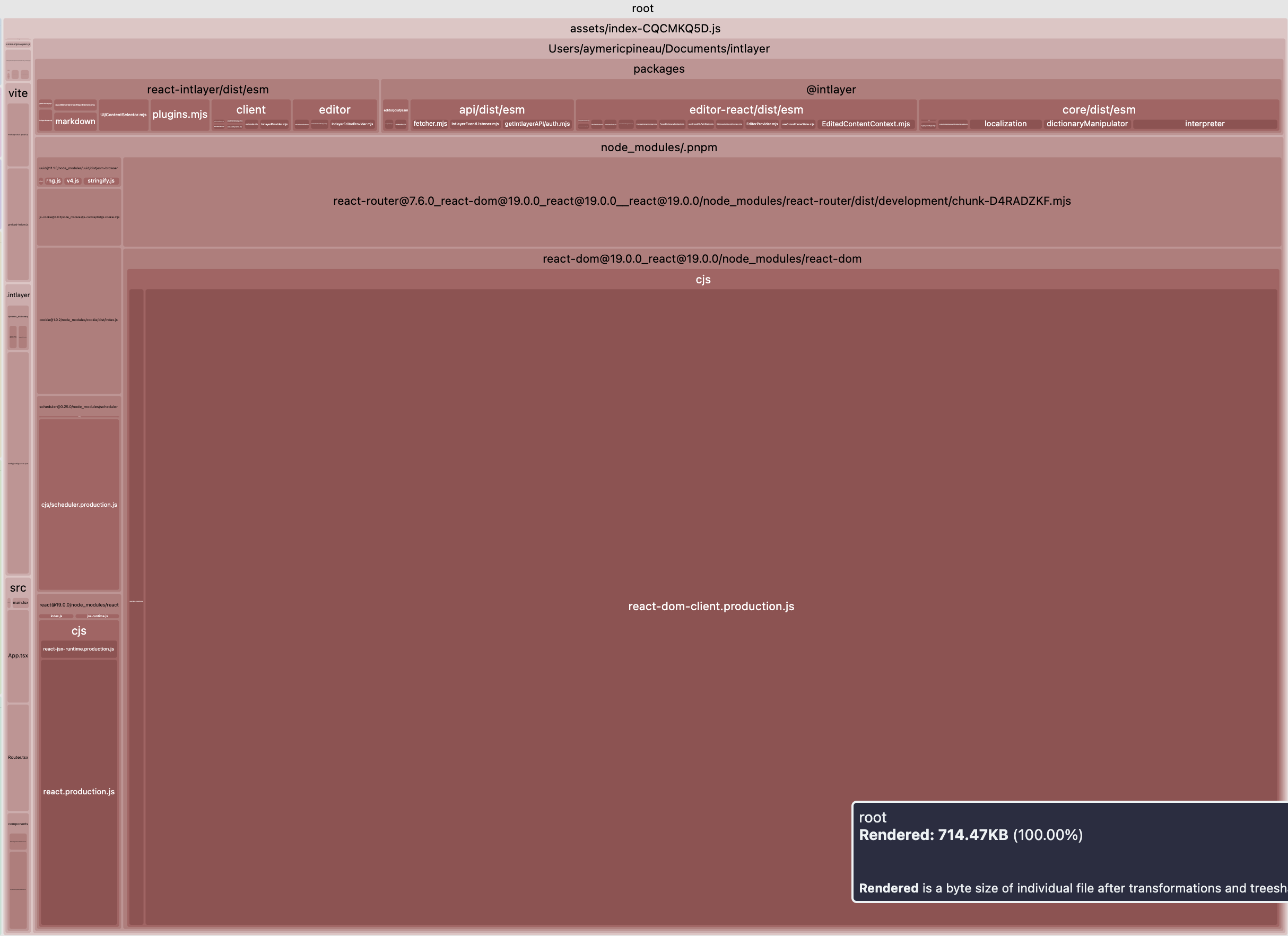
    以下是三种解决方案在多语言应用中,浏览器加载的 JavaScript bundle 大小的对比。

    如果应用中不需要任何格式化器,tree-shaking 后导出的函数列表将是:

    • next-intlayer: useIntlayer,useLocale,NextIntlClientProvider,(包大小为 180.6 kB -> 15.24 kB(gzip))
    • next-intl: useTranslations,useLocale,NextIntlClientProvider,(包大小为 101.3 kB -> 31.4 kB(gzip))
    • next-i18next: useTranslation,useI18n,I18nextProvider,(包大小为 80.7 kB -> 25.5 kB(gzip))

    这些函数只是围绕 React 上下文/状态的包装器,因此 i18n 库对包大小的总体影响很小。

    内容和翻译

    这部分内容常常被开发者忽视,但让我们考虑一个由10个页面和10种语言组成的应用程序的情况。为了简化计算,假设每个页面都包含100%独特的内容(实际上,许多内容在页面之间是冗余的,例如页面标题、页眉、页脚等)。

    一个想访问 /fr/about 页面用户将加载该语言下的一个页面内容。忽略内容优化意味着不必要地加载了应用内容的8200% ((1 + (((10个页面 - 1) × (10种语言 - 1)))) × 100)。你看到了问题吗?即使这些内容仍然是文本,虽然你可能更倾向于优化网站的图片,但你实际上是在全球范围内发送无用内容,并让用户的计算机白白处理这些内容。

    两个重要的问题:

    • 按路由拆分:

      如果我在 /about 页面,我不想加载 /home 页面的内容
    • 按语言拆分:

      如果我在 /fr/about 页面,我不想加载 /en/about 页面的内容

    同样,三种解决方案都意识到这些问题,并允许管理这些优化。三者之间的区别在于开发者体验(DX)。

    next-intl 和 next-i18next 使用集中式方法管理翻译,允许按语言和子文件拆分 JSON。在 next-i18next 中,我们称这些 JSON 文件为“命名空间”;next-intl 允许声明消息。在 intlayer 中,我们称这些 JSON 文件为“词典”。

    • 在 next-intl 的情况下,类似于 next-i18next,内容是在页面/布局级别加载的,然后这些内容被加载到一个上下文提供者中。这意味着开发者必须手动管理每个页面将要加载的 JSON 文件。
    实际上,这意味着开发者经常跳过这种优化,倾向于为了简单起见在页面的上下文提供者中加载所有内容。
    • 在 intlayer 的情况下,所有内容都在应用中加载。然后一个插件(@intlayer/babel / @intlayer/swc)负责通过只加载页面上使用的内容来优化包。因此,开发者不需要手动管理将要加载的字典。这允许更好的优化、更好的可维护性,并减少开发时间。

    随着应用程序的增长(尤其是当多个开发人员共同开发应用时),常常会忘记从 JSON 文件中移除不再使用的内容。

    请注意,在所有情况下(next-intl、next-i18next、intlayer),所有 JSON 都会被加载。

    这就是 Intlayer 方法更高效的原因:如果某个组件不再使用,其对应的字典不会被加载到包中。

    库如何处理回退也非常重要。假设应用默认语言是英语,用户访问 /fr/about 页面。如果法语翻译缺失,我们将考虑使用英语作为回退语言。

    在 next-intl 和 next-i18next 的情况下,库需要加载与当前语言环境相关的 JSON,同时还要加载回退语言环境的 JSON。因此,假设所有内容都已被翻译,每个页面都会加载 100% 不必要的内容。相比之下,intlayer 在词典构建时处理回退。因此,每个页面只会加载实际使用的内容。

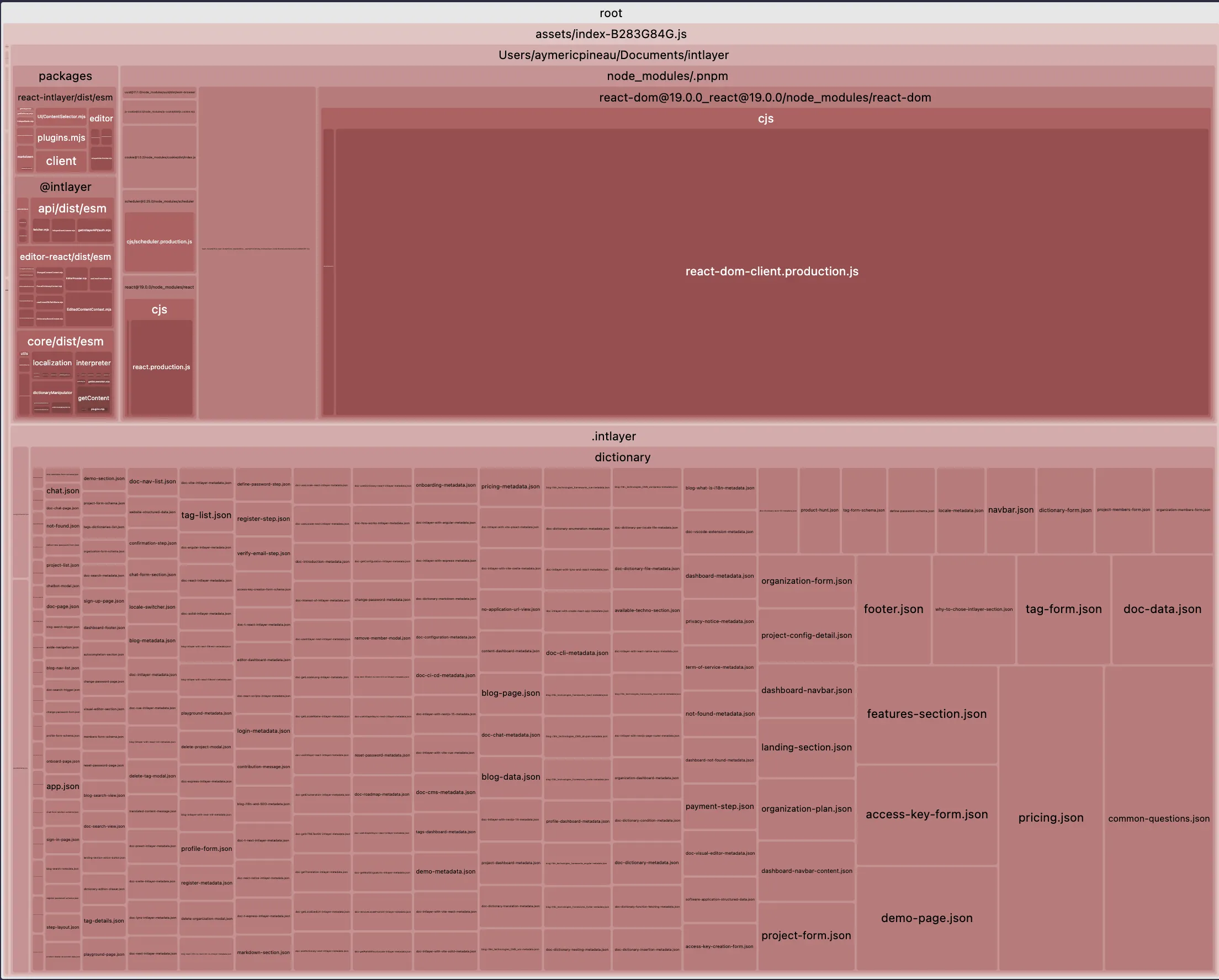
    下面是使用 intlayer 在 vite + react 应用中进行包大小优化的影响示例:

    显示表格的所有内容

    在弹窗中打开表格以清晰地查看所有数据

    优化后的包 未优化的包
    优化后的包 未优化的包

    TypeScript 与安全性

    next-intl

    • 具备扎实的 TypeScript 支持,但默认情况下键没有严格类型;你需要手动维护安全模式。

    next-i18next

    • 钩子的基础类型定义;严格的键类型需要额外的工具/配置。

    intlayer

    • 从你的内容生成严格类型。IDE 自动补全和编译时错误能在部署前捕获拼写错误和缺失的键。

    重要原因: 强类型将失败提前到左侧(CI/构建阶段),而非右侧(运行时)。


    缺失翻译处理

    next-intl

    • 依赖运行时回退(例如显示键名或默认语言)。构建不会失败。

    next-i18next

    • 依赖运行时回退(例如显示键名或默认语言)。构建不会失败。

    intlayer

    • 构建时检测,对缺失的语言或键发出警告/错误。

    重要原因: 在构建时捕获缺口,防止生产环境出现“神秘字符串”,并符合严格的发布门控。


    路由、中间件与 URL 策略

    next-intl

    • 支持 Next.js 本地化路由,适用于 App Router。

    next-i18next

    • 支持 Next.js 本地化路由,适用于 App Router。

    intlayer

    • 包含上述所有功能,外加 i18n 中间件(通过请求头/Cookies 进行语言环境检测)和用于生成本地化 URL 及 <link rel="alternate" hreflang="…"> 标签的 辅助工具。

    重要性说明: 减少自定义粘合层;实现跨语言环境的 一致用户体验 和 干净的 SEO。


    服务器组件(RSC)对齐

    next-intl

    • 支持 Next.js 13+。在混合设置中,通常需要通过组件树传递 t 函数/格式化器。

    next-i18next

    • 支持 Next.js 13+。在跨边界传递翻译工具时有类似的限制。

    intlayer

    • 支持 Next.js 13+,并通过一致的 API 和面向 RSC 的提供者平滑处理服务器/客户端边界,避免来回传递格式化器或 t 函数。

    重要原因: 更清晰的思维模型,减少混合树中的边缘情况。


    开发体验(DX)、工具链与维护

    next-intl

    • 通常与外部本地化平台和编辑工作流配合使用。

    next-i18next

    • 通常与外部本地化平台和编辑工作流配合使用。

    intlayer

    • 提供一个免费的可视化编辑器和可选的CMS(支持Git友好或外部化),以及一个VSCode扩展和使用您自己的提供商密钥的AI辅助翻译。

    重要原因: 降低运营成本,缩短开发者与内容作者之间的反馈周期。

    与本地化平台(TMS)的集成

    大型组织通常依赖诸如 Crowdin、Phrase、Lokalise、Localizely 或 Localazy 等翻译管理系统(TMS)。

    • 公司关心的原因

      • 协作与角色:涉及多方参与者:开发者、产品经理、翻译人员、审核人员、市场团队。
      • 规模与效率:持续本地化,实时上下文审查。
    • next-intl / next-i18next

      • 通常使用集中式 JSON 目录,因此与 TMS 的导出/导入非常直接。
      • 针对上述平台有成熟的生态系统和示例/集成。
    • Intlayer

      • 鼓励使用去中心化的、按组件划分的字典,并支持TypeScript/TSX/JS/JSON/MD 内容。
      • 这提升了代码的模块化,但当工具期望集中式、扁平的 JSON 文件时,可能会使即插即用的 TMS 集成变得更困难。
      • Intlayer 提供了替代方案:AI 辅助翻译(使用您自己的提供商密钥)、可视化编辑器/CMS,以及用于捕获和预填空缺的CLI/CI 工作流。
    注意:next-intl 和 i18next 也支持 TypeScript 目录。如果你的团队将消息存储在 .ts 文件中,或者按功能模块分散存储,可能会遇到类似的 TMS 集成难题。然而,许多 next-intl 的配置仍然集中在 locales/ 文件夹中,这使得重构为 JSON 以适配 TMS 更加容易。

    开发者体验

    本部分将对这三种解决方案进行深入比较。我们不会仅考虑各方案“入门”文档中描述的简单案例,而是会考虑一个更接近真实项目的实际用例。

    应用结构

    应用结构对于确保代码库的良好可维护性非常重要。

    bash
    复制代码

    复制代码到剪贴板

    .├── i18n.config.ts└── src  ├── locales  │   ├── en  │   │  ├── common.json  │   │  └── about.json  │   └── fr  │      ├── common.json  │      └── about.json  ├── app  │   ├── i18n  │   │   └── server.ts  │   └── [locale]  │       ├── layout.tsx  │       └── about.tsx  └── components      ├── I18nProvider.tsx      ├── ClientComponent.tsx      └── ServerComponent.tsx
    bash
    复制代码

    复制代码到剪贴板

    .├── i18n.ts├── locales│   ├── en│   │  ├── home.json│   │  └── navbar.json│   ├── fr│   │  ├── home.json│   │  └── navbar.json│   └── es│      ├── home.json│      └── navbar.json└── src  ├── middleware.ts  ├── app  │   ├── i18n  │   │   └── server.ts  │   └── [locale]  │       └── home.tsx  └── components      └── Navbar          └── index.tsx
    bash
    复制代码

    复制代码到剪贴板

    .├── intlayer.config.ts└── src  ├── middleware.ts  ├── app  │   └── [locale]  │       ├── layout.tsx  │       └── home  │           ├── index.tsx  │           └── index.content.ts  └── components      └── Navbar          ├── index.tsx          └── index.content.ts

    比较

    • next-intl / next-i18next:集中式目录(JSON;命名空间/消息)。结构清晰,易于与翻译平台集成,但随着应用增长,可能导致更多跨文件编辑。
    • Intlayer:每个组件配有 .content.{ts|js|json} 字典,与组件共存。更便于组件重用和局部推理;增加文件数量,依赖构建时工具。

    设置和加载内容

    正如之前提到的,您必须优化每个 JSON 文件导入到代码中的方式。 库如何处理内容加载非常重要。

    next-i18next.config.js
    复制代码

    复制代码到剪贴板

    module.exports = {i18n: {  locales: ["en", "fr", "es"],  defaultLocale: "en",},};
    src/app/_app.tsx
    复制代码

    复制代码到剪贴板

    import { appWithTranslation } from "next-i18next";const MyApp = ({ Component, pageProps }) => <Component {...pageProps} />;export default appWithTranslation(MyApp);
    src/app/[locale]/about/page.tsx
    复制代码

    复制代码到剪贴板

    import type { GetStaticProps } from "next";import { serverSideTranslations } from "next-i18next/serverSideTranslations";import { useTranslation } from "next-i18next";import { I18nextProvider, initReactI18next } from "react-i18next";import { createInstance } from "i18next";import { ClientComponent, ServerComponent } from "@components";export default function HomePage({ locale }: { locale: string }) {// 明确声明该组件使用的命名空间const resources = await loadMessagesFor(locale); // 你的加载器(JSON 等)const i18n = createInstance();i18n.use(initReactI18next).init({  lng: locale,  fallbackLng: "en",  resources,  ns: ["common", "about"],  defaultNS: "common",  interpolation: { escapeValue: false },});const { t } = useTranslation("about");return (  <I18nextProvider i18n={i18n}>    <main>      <h1>{t("title")}</h1>      <ClientComponent />      <ServerComponent />    </main>  </I18nextProvider>);}export const getStaticProps: GetStaticProps = async ({ locale }) => {// 仅预加载此页面所需的命名空间return {  props: {    ...(await serverSideTranslations(locale ?? "en", ["common", "about"])),  },};};
    i18n.ts
    复制代码

    复制代码到剪贴板

    import { getRequestConfig } from "next-intl/server";import { notFound } from "next/navigation";// 可以从共享配置中导入const locales = ["en", "fr", "es"];export default getRequestConfig(async ({ locale }) => {// 验证传入的 `locale` 参数是否有效if (!locales.includes(locale)) notFound();return {  messages: (await import(`../messages/${locale}.json`)).default,};});
    src/app/[locale]/about/layout.tsx
    复制代码

    复制代码到剪贴板

    import { NextIntlClientProvider } from "next-intl";import { getMessages, unstable_setRequestLocale } from "next-intl/server";import pick from "lodash/pick";export default async function LocaleLayout({children,params,}: {children: React.ReactNode;params: { locale: string };}) {const { locale } = params;// 为此服务器渲染(RSC)设置活动请求语言环境unstable_setRequestLocale(locale);// 消息通过 src/i18n/request.ts 在服务器端加载// (参见 next-intl 文档)。这里我们只推送客户端组件所需的子集// 以优化负载。const messages = await getMessages();const clientMessages = pick(messages, ["common", "about"]);const rtlLocales = ["ar", "he", "fa", "ur"];return (  <html lang={locale} dir={rtlLocales.includes(locale) ? "rtl" : "ltr"}>    <body>      <NextIntlClientProvider locale={locale} messages={clientMessages}>        {children}      </NextIntlClientProvider>    </body>  </html>);}
    src/app/[locale]/about/page.tsx
    复制代码

    复制代码到剪贴板

    import { getTranslations } from "next-intl/server";import { ClientComponent, ServerComponent } from "@components";export default async function LandingPage({params,}: {params: { locale: string };}) {// 严格的服务器端加载(不会在客户端水合)const t = await getTranslations("about");return (  <main>    <h1>{t("title")}</h1>    <ClientComponent />    <ServerComponent />  </main>);}
    intlayer.config.ts
    复制代码

    复制代码到剪贴板

    export default {internationalization: {  locales: ["en", "fr", "es"],  defaultLocale: "en",},};
    src/app/[locale]/layout.tsx
    复制代码

    复制代码到剪贴板

    import { getHTMLTextDir } from "intlayer";import {IntlayerClientProvider,generateStaticParams,type NextLayoutIntlayer,} from "next-intlayer";export const dynamic = "force-static";const LandingLayout: NextLayoutIntlayer = async ({ children, params }) => {const { locale } = await params;return (  <html lang={locale} dir={getHTMLTextDir(locale)}>    <IntlayerClientProvider locale={locale}>      {children}    </IntlayerClientProvider>  </html>);};export default LandingLayout;
    src/app/[locale]/about/page.tsx
    复制代码

    复制代码到剪贴板

    import { PageContent } from "@components/PageContent";import type { NextPageIntlayer } from "next-intlayer";import { IntlayerServerProvider, useIntlayer } from "next-intlayer/server";import { ClientComponent, ServerComponent } from "@components";const LandingPage: NextPageIntlayer = async ({ params }) => {const { locale } = await params;const { title } = useIntlayer("about", locale);return (  <IntlayerServerProvider locale={locale}>    <main>      <h1>{title}</h1>      <ClientComponent />      <ServerComponent />    </main>  </IntlayerServerProvider>);};export default LandingPage;

    比较

    这三者都支持按语言环境加载内容和提供者。

    • 使用 next-intl/next-i18next 时,通常会根据路由加载选定的消息/命名空间,并在需要的地方放置提供者。

    • 使用 Intlayer 时,增加了构建时分析以推断使用情况,这可以减少手动连接,并可能允许使用单一根提供者。

    根据团队偏好在显式控制和自动化之间进行选择。

    在客户端组件中的使用

    让我们来看一个渲染计数器的客户端组件示例。

    翻译(必须是真实的 JSON,位于 public/locales/...)

    public/locales/en/about.json
    复制代码

    复制代码到剪贴板

    {"counter": {  "label": "Counter",  "increment": "Increment"}}
    public/locales/fr/about.json
    复制代码

    复制代码到剪贴板

    {"counter": {  "label": "计数器",  "increment": "增加"}}

    客户端组件

    src/components/ClientComponentExample.tsx
    复制代码

    复制代码到剪贴板

    "use client";import React, { useMemo, useState } from "react";import { useTranslation } from "next-i18next";const ClientComponentExample = () => {const { t, i18n } = useTranslation("about");const [count, setCount] = useState(0);// next-i18next 不提供 useNumber;使用 Intl.NumberFormatconst numberFormat = new Intl.NumberFormat(i18n.language);return (  <div>    <p>{numberFormat.format(count)}</p>    <button      aria-label={t("counter.label")}      onClick={() => setCount((count) => count + 1)}    >      {t("counter.increment")}    </button>  </div>);};

    别忘了在页面的 serverSideTranslations 中添加 "about" 命名空间
    这里使用的是 react 19.x.x 版本,但对于较低版本,你需要使用 useMemo 来存储格式化器的实例,因为它是一个开销较大的函数

    翻译(复用结构;根据需要加载到 next-intl 消息中)

    locales/en/about.json
    复制代码

    复制代码到剪贴板

    {"counter": {  "label": "Counter",  "increment": "Increment"}}
    locales/fr/about.json
    复制代码

    复制代码到剪贴板

    {"counter": {  "label": "Compteur",  "increment": "Incrémenter"}}

    客户端组件

    src/components/ClientComponentExample.tsx
    复制代码

    复制代码到剪贴板

    "use client";import React, { useState } from "react";import { useTranslations, useFormatter } from "next-intl";const ClientComponentExample = () => {// 直接作用于嵌套对象的作用域const t = useTranslations("about.counter");const format = useFormatter();const [count, setCount] = useState(0);return (  <div>    <p>{format.number(count)}</p>    <button      aria-label={t("label")}      onClick={() => setCount((count) => count + 1)}    >      {t("increment")}    </button>  </div>);};
    不要忘记在页面客户端消息中添加 "about" 消息

    内容

    src/components/ClientComponentExample/index.content.ts
    复制代码

    复制代码到剪贴板

    import { t, type Dictionary } from "intlayer";const counterContent = {key: "counter",content: {  label: t({ zh: "计数器", en: "Counter", fr: "Compteur" }),  increment: t({ zh: "递增", en: "Increment", fr: "Incrémenter" }),},} satisfies Dictionary;export default counterContent;

    客户端组件

    src/components/ClientComponentExample/index.tsx
    复制代码

    复制代码到剪贴板

    "use client";import React, { useState } from "react";import { useNumber, useIntlayer } from "next-intlayer";const ClientComponentExample = () => {const [count, setCount] = useState(0);const { label, increment } = useIntlayer("counter"); // 返回字符串const { number } = useNumber();return (  <div>    <p>{number(count)}</p>    <button aria-label={label} onClick={() => setCount((count) => count + 1)}>      {increment}    </button>  </div>);};

    比较

    • 数字格式化

      • next-i18next:没有 useNumber;使用 Intl.NumberFormat(或 i18next-icu)。
      • next-intl:useFormatter().number(value)。
      • Intlayer:内置 useNumber()。
    • 键

      • 保持嵌套结构(about.counter.label),并相应地限定钩子的作用域(useTranslation("about") + t("counter.label") 或 useTranslations("about.counter") + t("label"))。
    • 文件位置

      • next-i18next 期望 JSON 文件位于 public/locales/{lng}/{ns}.json。
      • next-intl 灵活;根据配置加载消息。
      • Intlayer 将内容存储在 TS/JS 字典中,并通过键解析。

    在服务器组件中的使用

    我们以一个 UI 组件为例。该组件是一个服务器组件,并且应该能够作为客户端组件的子组件插入。(页面(服务器组件)-> 客户端组件 -> 服务器组件)。由于该组件可以作为客户端组件的子组件插入,因此它不能是异步的。

    src/pages/about.tsx
    复制代码

    复制代码到剪贴板

    import type { GetStaticProps } from "next";import { useTranslation } from "next-i18next";type ServerComponentProps = {count: number;};const ServerComponent = ({ count }: ServerComponentProps) => {const { t, i18n } = useTranslation("about");const formatted = new Intl.NumberFormat(i18n.language).format(count);return (  <div>    <p>{formatted}</p>    <button aria-label={t("counter.label")}>{t("counter.increment")}</button>  </div>);};
    src/components/ServerComponent.tsx
    复制代码

    复制代码到剪贴板

    type ServerComponentProps = {count: number;t: (key: string) => string;formatter: Intl.NumberFormat;};const ServerComponent = ({ t, count, formatter }: ServerComponentProps) => {const formatted = formatter.format(count);return (  <div>    <p>{formatted}</p>    <button aria-label={t("label")}>{t("increment")}</button>  </div>);};

    由于服务器组件不能是异步的,因此需要将翻译函数和格式化函数作为属性传递。

    • const t = await getTranslations("about.counter");
    • const formatter = await getFormatter().then((formatter) => formatter.number());
    src/components/ServerComponent.tsx
    复制代码

    复制代码到剪贴板

    import { useIntlayer, useNumber } from "next-intlayer/server";const ServerComponent = ({ count }: { count: number }) => {const { label, increment } = useIntlayer("counter");const { number } = useNumber();return (  <div>    <p>{number(count)}</p>    <button aria-label={label}>{increment}</button>  </div>);};
    Intlayer 通过 next-intlayer/server 提供了服务器安全的钩子。为了工作,useIntlayer 和 useNumber 使用类似钩子的语法,类似于客户端钩子,但在底层依赖于服务器上下文(IntlayerServerProvider)。

    元数据 / 网站地图 / 机器人协议

    翻译内容固然重要,但人们通常忘记国际化的主要目标是让你的网站对全世界更具可见性。I18n 是提升你网站可见性的一个强大杠杆。

    以下是关于多语言 SEO 的一些最佳实践列表。

    • 在 <head> 标签中设置 hreflang 元标签 > 这有助于搜索引擎理解页面支持哪些语言
    • 在 sitemap.xml 中列出所有页面的翻译,使用 http://www.w3.org/1999/xhtml XML 模式 >
    • 不要忘记在 robots.txt 中排除带前缀的页面(例如 /dashboard,以及 /fr/dashboard,/es/dashboard) >
    • 使用自定义 Link 组件重定向到最本地化的页面(例如法语中 <a href="/fr/about">A propos</a>) >

    开发者经常忘记正确地在不同语言环境中引用他们的页面。

    i18n.config.ts
    复制代码

    复制代码到剪贴板

    export const locales = ["en", "fr"] as const;export type Locale = (typeof locales)[number];export const defaultLocale: Locale = "en";export function localizedPath(locale: string, path: string) { return locale === defaultLocale ? path : "/" + locale + path;}const ORIGIN = "https://example.com";export function abs(locale: string, path: string) { return ORIGIN + localizedPath(locale, path);}
    src/app/[locale]/about/layout.tsx
    复制代码

    复制代码到剪贴板

    import type { Metadata } from "next";import { locales, defaultLocale, localizedPath } from "@/i18n.config";export async function generateMetadata({ params,}: { params: { locale: string };}): Promise<Metadata> { const { locale } = params; // 动态导入正确的 JSON 文件 const messages = (   await import("@/../public/locales/" + locale + "/about.json") ).default; const languages = Object.fromEntries(   locales.map((locale) => [locale, localizedPath(locale, "/about")]) ); return {   title: messages.title,   description: messages.description,   alternates: {     canonical: localizedPath(locale, "/about"),     languages: { ...languages, "x-default": "/about" },   }, };}export default async function AboutPage() { return <h1>关于</h1>;}
    src/app/sitemap.ts
    复制代码

    复制代码到剪贴板

    import type { MetadataRoute } from "next";import { locales, defaultLocale, abs } from "@/i18n.config";export default function sitemap(): MetadataRoute.Sitemap { const languages = Object.fromEntries(   locales.map((locale) => [locale, abs(locale, "/about")]) ); return [   {     url: abs(defaultLocale, "/about"),     lastModified: new Date(),     changeFrequency: "monthly",     priority: 0.7,     alternates: { languages },   }, ];}
    src/app/robots.ts
    复制代码

    复制代码到剪贴板

    import type { MetadataRoute } from "next";import { locales, defaultLocale, localizedPath } from "@/i18n.config";const ORIGIN = "https://example.com";const expandAllLocales = (path: string) => [ localizedPath(defaultLocale, path), ...locales   .filter((locale) => locale !== defaultLocale)   .map((locale) => localizedPath(locale, path)),];export default function robots(): MetadataRoute.Robots { const disallow = [   ...expandAllLocales("/dashboard"),   ...expandAllLocales("/admin"), ]; return {   rules: { userAgent: "*", allow: ["/"], disallow },   host: ORIGIN,   sitemap: ORIGIN + "/sitemap.xml", };}
    src/app/[locale]/about/layout.tsx
    复制代码

    复制代码到剪贴板

    import type { Metadata } from "next";import { locales, defaultLocale } from "@/i18n";import { getTranslations } from "next-intl/server";function localizedPath(locale: string, path: string) { // 如果是默认语言,返回原路径,否则加上语言前缀 return locale === defaultLocale ? path : "/" + locale + path;}export async function generateMetadata({ params,}: { params: { locale: string };}): Promise<Metadata> { const { locale } = params; // 获取指定语言和命名空间的翻译内容 const t = await getTranslations({ locale, namespace: "about" }); const url = "/about"; // 构建所有语言对应的本地化路径对象 const languages = Object.fromEntries(   locales.map((locale) => [locale, localizedPath(locale, url)]) ); return {   title: t("title"), // 页面标题   description: t("description"), // 页面描述   alternates: {     canonical: localizedPath(locale, url), // 规范链接     languages: { ...languages, "x-default": url }, // 语言版本链接及默认链接   }, };}// ... 页面代码的其余部分
    src/app/sitemap.ts
    复制代码

    复制代码到剪贴板

    import type { MetadataRoute } from "next";import { locales, defaultLocale } from "@/i18n";const origin = "https://example.com";const formatterLocalizedPath = (locale: string, path: string) => locale === defaultLocale ? origin + path : origin + "/" + locale + path;export default function sitemap(): MetadataRoute.Sitemap { const aboutLanguages = Object.fromEntries(   locales.map((l) => [l, formatterLocalizedPath(l, "/about")]) ); return [   {     url: formatterLocalizedPath(defaultLocale, "/about"),     lastModified: new Date(),     changeFrequency: "monthly",     priority: 0.7,     alternates: { languages: aboutLanguages },   }, ];}
    src/app/robots.ts
    复制代码

    复制代码到剪贴板

    import type { MetadataRoute } from "next";import { locales, defaultLocale } from "@/i18n";const origin = "https://example.com";const withAllLocales = (path: string) => [ path, ...locales   .filter((locale) => locale !== defaultLocale)   .map((locale) => "/" + locale + path),];export default function robots(): MetadataRoute.Robots { const disallow = [   ...withAllLocales("/dashboard"),   ...withAllLocales("/admin"), ]; return {   rules: { userAgent: "*", allow: ["/"], disallow },   host: origin,   sitemap: origin + "/sitemap.xml", };}
    src/app/[locale]/about/layout.tsx
    复制代码

    复制代码到剪贴板

    import { getIntlayer, getMultilingualUrls } from "intlayer";import type { Metadata } from "next";import type { LocalPromiseParams } from "next-intlayer";export const generateMetadata = async ({ params,}: LocalPromiseParams): Promise<Metadata> => { const { locale } = await params; const metadata = getIntlayer("page-metadata", locale); const multilingualUrls = getMultilingualUrls("/about"); return {   ...metadata,   alternates: {     canonical: multilingualUrls[locale as keyof typeof multilingualUrls],     languages: { ...multilingualUrls, "x-default": "/about" },   }, };};// ... 页面代码的其余部分
    src/app/sitemap.ts
    复制代码

    复制代码到剪贴板

    import { getMultilingualUrls } from "intlayer";import type { MetadataRoute } from "next";const sitemap = (): MetadataRoute.Sitemap => [ {   url: "https://example.com/about",   alternates: {     languages: { ...getMultilingualUrls("https://example.com/about") },   }, },];
    src/app/robots.ts
    复制代码

    复制代码到剪贴板

    import { getMultilingualUrls } from "intlayer";import type { MetadataRoute } from "next";const getAllMultilingualUrls = (urls: string[]) => urls.flatMap((url) => Object.values(getMultilingualUrls(url)) as string[]);const robots = (): MetadataRoute.Robots => ({ rules: {   userAgent: "*",   allow: ["/"],   disallow: getAllMultilingualUrls(["/dashboard"]), }, host: "https://example.com", sitemap: "https://example.com/sitemap.xml",});export default robots;
    Intlayer 提供了一个 getMultilingualUrls 函数,用于为您的站点地图生成多语言 URL。

    胜者是…

    这并不简单。每个选项都有权衡。以下是我的看法:

    next-intl

    • 最简单、轻量,强制你做出的决策较少。如果你想要一个极简的解决方案,且你能接受集中式目录,并且你的应用是小型到中型。

    next-i18next

    • 成熟、功能丰富,有大量社区插件,但设置成本较高。如果你需要i18next 的插件生态系统(例如,通过插件实现高级 ICU 规则),且你的团队已经熟悉 i18next,愿意接受更多配置以获得灵活性。

    Intlayer

    • 为现代 Next.js 构建,具有模块化内容、类型安全、工具支持和更少的样板代码。如果你重视组件范围的内容、严格的 TypeScript、构建时保证、摇树优化,以及内置的路由/SEO/编辑器工具, 尤其是针对Next.js 应用路由器、设计系统和大型模块化代码库。

    如果你偏好最小化设置并且能接受一些手动连接,next-intl 是一个不错的选择。如果你需要所有功能且不介意复杂性,next-i18next 也适用。但如果你想要一个现代、可扩展、模块化且带有内置工具的解决方案,Intlayer 旨在为你开箱即用提供这些功能。

    企业团队的替代方案:如果您需要一个经过充分验证的解决方案,能够完美配合像 Crowdin、Phrase 或其他专业翻译管理系统等成熟的本地化平台,建议考虑具有成熟生态系统和可靠集成的 next-intl 或 next-i18next。
    未来路线图:Intlayer 还计划开发基于 i18next 和 next-intl 解决方案的插件。这将使您能够利用 Intlayer 在自动化、语法和内容管理方面的优势,同时保持这些成熟解决方案在应用代码中提供的安全性和稳定性。

    GitHub STARs

    GitHub 星标是衡量项目受欢迎程度、社区信任度和长期相关性的有力指标。虽然它们不是技术质量的直接衡量标准,但反映了有多少开发者认为该项目有用、关注其进展并可能采用它。对于评估项目价值,星标有助于比较不同选项的吸引力,并提供生态系统增长的洞察。

    星标历史图表


    结论

    所有三个库在核心本地化方面都取得了成功。区别在于,在现代 Next.js中实现一个健壮且可扩展的设置,你需要付出多少工作量:

    • 使用Intlayer,模块化内容、严格的 TS、构建时安全、摇树优化的包以及一流的 App Router 和 SEO 工具都是默认配置,而非额外负担。
    • 如果你的团队重视在多语言、组件驱动的应用中实现可维护性和速度,Intlayer 提供了目前最完整的体验。

    更多详情请参阅《为什么选择 Intlayer?》文档。

    自动化 vue-i18n
    react-i18next vs react-intl vs Intlayer
    Alt+→

    在此页面

      讨论是匿名的,并会定期审查以解决常见问题。欢迎分享功能想法、对文档的反馈或任何与 Intlayer 相关的内容, 我们会利用这些意见来制定路线图并改进产品。

      .├── i18n.config.ts└── src  ├── locales  │   ├── en  │   │  ├── common.json  │   │  └── about.json  │   └── fr  │      ├── common.json  │      └── about.json  ├── app  │   ├── i18n  │   │   └── server.ts  │   └── [locale]  │       ├── layout.tsx  │       └── about.tsx  └── components      ├── I18nProvider.tsx      ├── ClientComponent.tsx      └── ServerComponent.tsx
      .├── i18n.ts├── locales│   ├── en│   │  ├── home.json│   │  └── navbar.json│   ├── fr│   │  ├── home.json│   │  └── navbar.json│   └── es│      ├── home.json│      └── navbar.json└── src  ├── middleware.ts  ├── app  │   ├── i18n  │   │   └── server.ts  │   └── [locale]  │       └── home.tsx  └── components      └── Navbar          └── index.tsx
      .├── intlayer.config.ts└── src  ├── middleware.ts  ├── app  │   └── [locale]  │       ├── layout.tsx  │       └── home  │           ├── index.tsx  │           └── index.content.ts  └── components      └── Navbar          ├── index.tsx          └── index.content.ts
      module.exports = {i18n: {  locales: ["en", "fr", "es"],  defaultLocale: "en",},};
      import { appWithTranslation } from "next-i18next";const MyApp = ({ Component, pageProps }) => <Component {...pageProps} />;export default appWithTranslation(MyApp);
      import type { GetStaticProps } from "next";import { serverSideTranslations } from "next-i18next/serverSideTranslations";import { useTranslation } from "next-i18next";import { I18nextProvider, initReactI18next } from "react-i18next";import { createInstance } from "i18next";import { ClientComponent, ServerComponent } from "@components";export default function HomePage({ locale }: { locale: string }) {// 明确声明该组件使用的命名空间const resources = await loadMessagesFor(locale); // 你的加载器(JSON 等)const i18n = createInstance();i18n.use(initReactI18next).init({  lng: locale,  fallbackLng: "en",  resources,  ns: ["common", "about"],  defaultNS: "common",  interpolation: { escapeValue: false },});const { t } = useTranslation("about");return (  <I18nextProvider i18n={i18n}>    <main>      <h1>{t("title")}</h1>      <ClientComponent />      <ServerComponent />    </main>  </I18nextProvider>);}export const getStaticProps: GetStaticProps = async ({ locale }) => {// 仅预加载此页面所需的命名空间return {  props: {    ...(await serverSideTranslations(locale ?? "en", ["common", "about"])),  },};};
      import { getRequestConfig } from "next-intl/server";import { notFound } from "next/navigation";// 可以从共享配置中导入const locales = ["en", "fr", "es"];export default getRequestConfig(async ({ locale }) => {// 验证传入的 `locale` 参数是否有效if (!locales.includes(locale)) notFound();return {  messages: (await import(`../messages/${locale}.json`)).default,};});
      import { NextIntlClientProvider } from "next-intl";import { getMessages, unstable_setRequestLocale } from "next-intl/server";import pick from "lodash/pick";export default async function LocaleLayout({children,params,}: {children: React.ReactNode;params: { locale: string };}) {const { locale } = params;// 为此服务器渲染(RSC)设置活动请求语言环境unstable_setRequestLocale(locale);// 消息通过 src/i18n/request.ts 在服务器端加载// (参见 next-intl 文档)。这里我们只推送客户端组件所需的子集// 以优化负载。const messages = await getMessages();const clientMessages = pick(messages, ["common", "about"]);const rtlLocales = ["ar", "he", "fa", "ur"];return (  <html lang={locale} dir={rtlLocales.includes(locale) ? "rtl" : "ltr"}>    <body>      <NextIntlClientProvider locale={locale} messages={clientMessages}>        {children}      </NextIntlClientProvider>    </body>  </html>);}
      import { getTranslations } from "next-intl/server";import { ClientComponent, ServerComponent } from "@components";export default async function LandingPage({params,}: {params: { locale: string };}) {// 严格的服务器端加载(不会在客户端水合)const t = await getTranslations("about");return (  <main>    <h1>{t("title")}</h1>    <ClientComponent />    <ServerComponent />  </main>);}
      export default {internationalization: {  locales: ["en", "fr", "es"],  defaultLocale: "en",},};
      import { getHTMLTextDir } from "intlayer";import {IntlayerClientProvider,generateStaticParams,type NextLayoutIntlayer,} from "next-intlayer";export const dynamic = "force-static";const LandingLayout: NextLayoutIntlayer = async ({ children, params }) => {const { locale } = await params;return (  <html lang={locale} dir={getHTMLTextDir(locale)}>    <IntlayerClientProvider locale={locale}>      {children}    </IntlayerClientProvider>  </html>);};export default LandingLayout;
      import { PageContent } from "@components/PageContent";import type { NextPageIntlayer } from "next-intlayer";import { IntlayerServerProvider, useIntlayer } from "next-intlayer/server";import { ClientComponent, ServerComponent } from "@components";const LandingPage: NextPageIntlayer = async ({ params }) => {const { locale } = await params;const { title } = useIntlayer("about", locale);return (  <IntlayerServerProvider locale={locale}>    <main>      <h1>{title}</h1>      <ClientComponent />      <ServerComponent />    </main>  </IntlayerServerProvider>);};export default LandingPage;
      {"counter": {  "label": "Counter",  "increment": "Increment"}}
      {"counter": {  "label": "计数器",  "increment": "增加"}}
      "use client";import React, { useMemo, useState } from "react";import { useTranslation } from "next-i18next";const ClientComponentExample = () => {const { t, i18n } = useTranslation("about");const [count, setCount] = useState(0);// next-i18next 不提供 useNumber;使用 Intl.NumberFormatconst numberFormat = new Intl.NumberFormat(i18n.language);return (  <div>    <p>{numberFormat.format(count)}</p>    <button      aria-label={t("counter.label")}      onClick={() => setCount((count) => count + 1)}    >      {t("counter.increment")}    </button>  </div>);};
      {"counter": {  "label": "Counter",  "increment": "Increment"}}
      {"counter": {  "label": "Compteur",  "increment": "Incrémenter"}}
      "use client";import React, { useState } from "react";import { useTranslations, useFormatter } from "next-intl";const ClientComponentExample = () => {// 直接作用于嵌套对象的作用域const t = useTranslations("about.counter");const format = useFormatter();const [count, setCount] = useState(0);return (  <div>    <p>{format.number(count)}</p>    <button      aria-label={t("label")}      onClick={() => setCount((count) => count + 1)}    >      {t("increment")}    </button>  </div>);};
      import { t, type Dictionary } from "intlayer";const counterContent = {key: "counter",content: {  label: t({ zh: "计数器", en: "Counter", fr: "Compteur" }),  increment: t({ zh: "递增", en: "Increment", fr: "Incrémenter" }),},} satisfies Dictionary;export default counterContent;
      "use client";import React, { useState } from "react";import { useNumber, useIntlayer } from "next-intlayer";const ClientComponentExample = () => {const [count, setCount] = useState(0);const { label, increment } = useIntlayer("counter"); // 返回字符串const { number } = useNumber();return (  <div>    <p>{number(count)}</p>    <button aria-label={label} onClick={() => setCount((count) => count + 1)}>      {increment}    </button>  </div>);};
      import type { GetStaticProps } from "next";import { useTranslation } from "next-i18next";type ServerComponentProps = {count: number;};const ServerComponent = ({ count }: ServerComponentProps) => {const { t, i18n } = useTranslation("about");const formatted = new Intl.NumberFormat(i18n.language).format(count);return (  <div>    <p>{formatted}</p>    <button aria-label={t("counter.label")}>{t("counter.increment")}</button>  </div>);};
      type ServerComponentProps = {count: number;t: (key: string) => string;formatter: Intl.NumberFormat;};const ServerComponent = ({ t, count, formatter }: ServerComponentProps) => {const formatted = formatter.format(count);return (  <div>    <p>{formatted}</p>    <button aria-label={t("label")}>{t("increment")}</button>  </div>);};
      import { useIntlayer, useNumber } from "next-intlayer/server";const ServerComponent = ({ count }: { count: number }) => {const { label, increment } = useIntlayer("counter");const { number } = useNumber();return (  <div>    <p>{number(count)}</p>    <button aria-label={label}>{increment}</button>  </div>);};
      export const locales = ["en", "fr"] as const;export type Locale = (typeof locales)[number];export const defaultLocale: Locale = "en";export function localizedPath(locale: string, path: string) { return locale === defaultLocale ? path : "/" + locale + path;}const ORIGIN = "https://example.com";export function abs(locale: string, path: string) { return ORIGIN + localizedPath(locale, path);}
      import type { Metadata } from "next";import { locales, defaultLocale, localizedPath } from "@/i18n.config";export async function generateMetadata({ params,}: { params: { locale: string };}): Promise<Metadata> { const { locale } = params; // 动态导入正确的 JSON 文件 const messages = (   await import("@/../public/locales/" + locale + "/about.json") ).default; const languages = Object.fromEntries(   locales.map((locale) => [locale, localizedPath(locale, "/about")]) ); return {   title: messages.title,   description: messages.description,   alternates: {     canonical: localizedPath(locale, "/about"),     languages: { ...languages, "x-default": "/about" },   }, };}export default async function AboutPage() { return <h1>关于</h1>;}
      import type { MetadataRoute } from "next";import { locales, defaultLocale, abs } from "@/i18n.config";export default function sitemap(): MetadataRoute.Sitemap { const languages = Object.fromEntries(   locales.map((locale) => [locale, abs(locale, "/about")]) ); return [   {     url: abs(defaultLocale, "/about"),     lastModified: new Date(),     changeFrequency: "monthly",     priority: 0.7,     alternates: { languages },   }, ];}
      import type { MetadataRoute } from "next";import { locales, defaultLocale, localizedPath } from "@/i18n.config";const ORIGIN = "https://example.com";const expandAllLocales = (path: string) => [ localizedPath(defaultLocale, path), ...locales   .filter((locale) => locale !== defaultLocale)   .map((locale) => localizedPath(locale, path)),];export default function robots(): MetadataRoute.Robots { const disallow = [   ...expandAllLocales("/dashboard"),   ...expandAllLocales("/admin"), ]; return {   rules: { userAgent: "*", allow: ["/"], disallow },   host: ORIGIN,   sitemap: ORIGIN + "/sitemap.xml", };}
      import type { Metadata } from "next";import { locales, defaultLocale } from "@/i18n";import { getTranslations } from "next-intl/server";function localizedPath(locale: string, path: string) { // 如果是默认语言,返回原路径,否则加上语言前缀 return locale === defaultLocale ? path : "/" + locale + path;}export async function generateMetadata({ params,}: { params: { locale: string };}): Promise<Metadata> { const { locale } = params; // 获取指定语言和命名空间的翻译内容 const t = await getTranslations({ locale, namespace: "about" }); const url = "/about"; // 构建所有语言对应的本地化路径对象 const languages = Object.fromEntries(   locales.map((locale) => [locale, localizedPath(locale, url)]) ); return {   title: t("title"), // 页面标题   description: t("description"), // 页面描述   alternates: {     canonical: localizedPath(locale, url), // 规范链接     languages: { ...languages, "x-default": url }, // 语言版本链接及默认链接   }, };}// ... 页面代码的其余部分
      import type { MetadataRoute } from "next";import { locales, defaultLocale } from "@/i18n";const origin = "https://example.com";const formatterLocalizedPath = (locale: string, path: string) => locale === defaultLocale ? origin + path : origin + "/" + locale + path;export default function sitemap(): MetadataRoute.Sitemap { const aboutLanguages = Object.fromEntries(   locales.map((l) => [l, formatterLocalizedPath(l, "/about")]) ); return [   {     url: formatterLocalizedPath(defaultLocale, "/about"),     lastModified: new Date(),     changeFrequency: "monthly",     priority: 0.7,     alternates: { languages: aboutLanguages },   }, ];}
      import type { MetadataRoute } from "next";import { locales, defaultLocale } from "@/i18n";const origin = "https://example.com";const withAllLocales = (path: string) => [ path, ...locales   .filter((locale) => locale !== defaultLocale)   .map((locale) => "/" + locale + path),];export default function robots(): MetadataRoute.Robots { const disallow = [   ...withAllLocales("/dashboard"),   ...withAllLocales("/admin"), ]; return {   rules: { userAgent: "*", allow: ["/"], disallow },   host: origin,   sitemap: origin + "/sitemap.xml", };}
      import { getIntlayer, getMultilingualUrls } from "intlayer";import type { Metadata } from "next";import type { LocalPromiseParams } from "next-intlayer";export const generateMetadata = async ({ params,}: LocalPromiseParams): Promise<Metadata> => { const { locale } = await params; const metadata = getIntlayer("page-metadata", locale); const multilingualUrls = getMultilingualUrls("/about"); return {   ...metadata,   alternates: {     canonical: multilingualUrls[locale as keyof typeof multilingualUrls],     languages: { ...multilingualUrls, "x-default": "/about" },   }, };};// ... 页面代码的其余部分
      import { getMultilingualUrls } from "intlayer";import type { MetadataRoute } from "next";const sitemap = (): MetadataRoute.Sitemap => [ {   url: "https://example.com/about",   alternates: {     languages: { ...getMultilingualUrls("https://example.com/about") },   }, },];
      import { getMultilingualUrls } from "intlayer";import type { MetadataRoute } from "next";const getAllMultilingualUrls = (urls: string[]) => urls.flatMap((url) => Object.values(getMultilingualUrls(url)) as string[]);const robots = (): MetadataRoute.Robots => ({ rules: {   userAgent: "*",   allow: ["/"],   disallow: getAllMultilingualUrls(["/dashboard"]), }, host: "https://example.com", sitemap: "https://example.com/sitemap.xml",});export default robots;